When an SDR A radio where most of the work is done by software on a computer. shows many signals but reception gets worse, increasing the gain How much an antenna or amplifier “boosts” the signal. even further is rarely the solution. The problem may be an antenna picking up too much noise, a strong out-of-band signal or a receiver The device that “listens” to radio signals. front end operating close to overload.
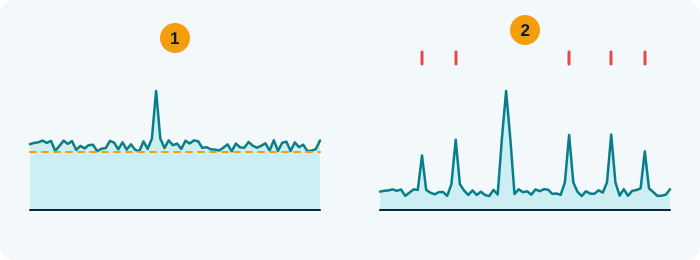
- Noise: the “floor” rises everywhere and hides weak signals
- Overload: fake signals appear and move when you change the gain
Quick test: lower the gain. If the strange signals vanish, it was overload.
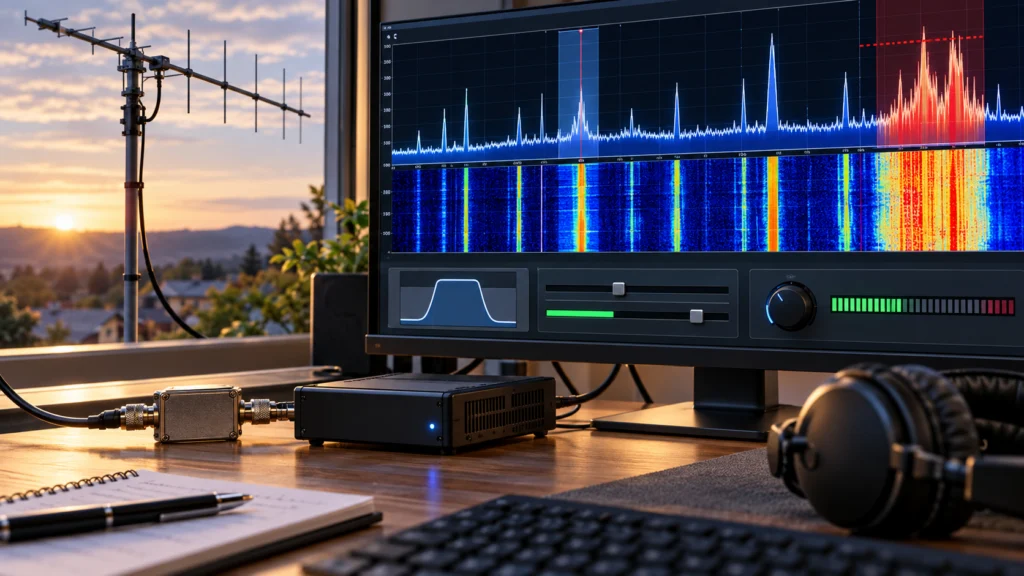
Teaching illustration created by RadioMeteo.
A large antenna and a busy waterfall do not guarantee better listening. Learn to distinguish noise, weak signals and overload by adjusting the antenna, gain, filters and demodulation.
The most effective approach starts with a simple diagnosis: reduce the gain, check the antenna, choose a suitable RF filter, and only then adjust bandwidth How much room a signal takes up across the frequencies. and demodulation. The goal is not to fill the waterfall A scrolling chart that shows signals as coloured stripes over time., but to obtain a signal that can actually be demodulated.
More signal does not always mean better listening
An SDR A radio where most of the work is done by software on a computer. receiver The device that “listens” to radio signals. has to handle the desired signal, noise and every other signal present in the received bandwidth How much room a signal takes up across the frequencies. at the same time. A larger or more efficient antenna can therefore improve sensitivity, but it can also bring local interference and very strong transmissions to the receiver input.
When the overall level becomes excessive, the receiver can lose headroom before compression and generate unwanted products. Typical symptoms include:
- signals that appear when the gain How much an antenna or amplifier “boosts” the signal. is increased but disappear when it is reduced;
- copies of the same transmission appearing on different frequencies;
- symmetric traces or signals that do not match the transmission bandwidth;
- weak signals disappearing when very strong stations are present;
- visible waterfall A scrolling chart that shows signals as coloured stripes over time. peaks that produce no useful audio.
These clues may point to images, intermodulation or overload, but none of them is conclusive on its own. Change one variable at a time and check whether the phenomenon changes.
Antenna: large, small or selective?
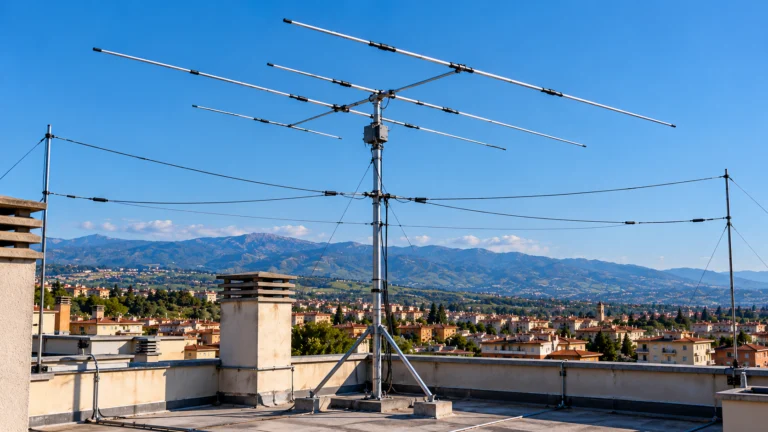
The antenna should be chosen according to the band A group of nearby frequencies used for the same purpose, like a lane on a motorway. of interest and the listening environment. A wideband solution can receive many parts of the spectrum The “map” of frequencies, where each signal shows up as a line or a small hill., but it can also expose the receiver The device that “listens” to radio signals. more strongly to powerful signals and interference from the household installation.
A small antenna, on the other hand, can be useful when overload is the main problem or when environmental noise increases along with the desired signal. It is not necessarily “deaf”: under certain conditions, it reduces what reaches the SDR A radio where most of the work is done by software on a computer. input and allows cleaner operation.
Whenever possible, compare:
- a smaller antenna with the main antenna;
- different orientations or polarizations;
- a more selective solution with a wideband one;
- the locally received signal with the same signal available on a WebSDR A radio receiver you can use for free over the internet, right in your browser..
If changing the antenna makes copies and anomalous signals disappear, the issue was not necessarily receiver sensitivity. It may have been the amount of RF energy at the input or the noise picked up by the antenna feedline.
Before adjusting gain: find out where the interference comes from
LAN cables, the mains supply, power supplies and system connections can all contribute to the noise captured by the receiving chain. Before buying ferrites or filters, it is useful to distinguish environmental interference from receiver The device that “listens” to radio signals. overload.
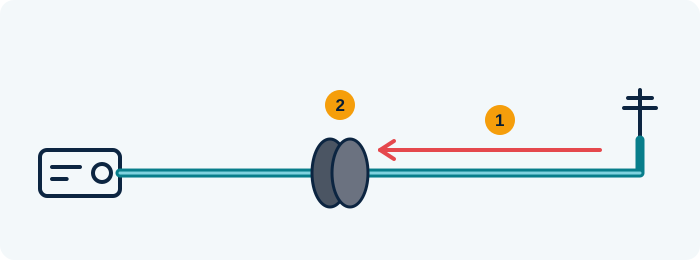
- Common-mode current: noise travels back to the radio on the outside of the shield
- The choke (ferrite or coiled cable) blocks it, the real signal passes
A ferrite only helps if the noise really travels on the cable.
Teaching illustration created by RadioMeteo.
A process of elimination
- Reduce the receiver gain How much an antenna or amplifier “boosts” the signal. and observe whether the interference decreases.
- Compare the main antenna with a second antenna or a different connection.
- Change the antenna’s orientation and position, if possible.
- Check whether the noise changes when the feedline is moved away from cables and power supplies.
- Compare the result with a remote receiver or WebSDR A radio receiver you can use for free over the internet, right in your browser..
If the noise remains almost unchanged even after a substantial reduction in gain, the source is likely to be in the environment or somewhere in the connection chain. If many signals appear or disappear when the gain is changed, the behaviour of the front end must also be considered.
Ferrites are not a universal cure. Their effectiveness depends on the material, frequency The “channel” a station transmits on., number of turns and installation point. Fitting them at random does not guarantee that interference will be reduced.
How to set SDR gain without overloading
For an initial adjustment, start with low gain How much an antenna or amplifier “boosts” the signal. and increase it gradually. The reference should not be the brightest waterfall A scrolling chart that shows signals as coloured stripes over time., but the point at which the desired signal improves without introducing new products or a disproportionate increase in noise.
With receivers based on RTL-SDR A small USB stick that turns your computer into a radio able to tune a huge range of frequencies., the software and device may offer separate settings for tuner A box that “matches” the antenna to the radio when they don’t quite get along. gain, manual or automatic operation, and digital AGC. The actual options depend on the hardware and configuration.
Manual gain and AGC
Manual gain makes it easier to examine the relationship between signal level and the appearance of artefacts. The RTL-SDR library requires manual gain to be enabled before it can be set, while the available values depend on the installed tuner.
AGC can be convenient under changing conditions, but it makes diagnosis less immediate: the receiver The device that “listens” to radio signals. may alter the overall level while you are trying to determine why a weak signal disappears next to a strong one. For initial tests, it is therefore useful, when the hardware and software allow it, to work with controlled and repeatable settings.
A practical sequence is:
- start with the lowest useful gain;
- temporarily disable automatic control if this helps isolate the problem;
- increase the gain in small steps;
- stop when the desired signal no longer improves in a meaningful way;
- back off if copies, anomalous lines or ghost signals appear.
RF and software filters do different jobs
A software filter acts on data that has already been sampled and can restrict what is demodulated. However, it does not prevent a strong signal from reaching the front end and overloading the preceding stages.
An external RF filter, placed before the receiver, can instead limit the bandwidth How much room a signal takes up across the frequencies. entering the chain. It is particularly useful when one part of the spectrum, such as a very strong local band, interferes with listening on another band.
Band-pass or notch?
- Band-pass filter: allows the band you want to hear through and attenuates signals outside it.
- Notch filter: attenuates a specific interfering portion of the spectrum while leaving other bands compatible with the filter available.
The choice must match the intended listening. A filter can protect the receiver from an interfering signal, but it can also attenuate useful signals in the same band. For this reason, test it both before and after changing the gain.
Bandwidth: narrow enough, but not too narrow
The filter bandwidth must contain the desired signal while excluding as much noise and as many adjacent signals as possible. There is no universal value: it depends on the demodulation mode and the modulation being received.
A filter that is too wide lets in more unwanted energy and can worsen the separation between nearby signals. One that is too narrow can cut off part of the modulation or audio, making a transmission seem weak or unintelligible even though it is actually present.
Adjustment should therefore be made while listening and observing at the same time:
- the continuity of the signal on the waterfall;
- the presence of useful audio;
- the noise on either side of the signal;
- the presence of adjacent emissions;
- the match between the selected mode and the type of transmission.
Sample rate is not merely a parameter for deciding how much of the spectrum to display. In the RTL-SDR library, it is also associated with baseband filter selection when supported by the tuner. Consequently, changing the sample rate can alter the observed behaviour, not just the width of the window on screen.
Why does the waterfall show a signal that cannot be heard?
The spectrum and waterfall display RF energy or FFT data. A peak by itself does not prove that a signal can be demodulated. To produce audio, you need the correct frequency, a suitable mode, compatible filter bandwidth and sufficient audio level.
Before assuming that the signal is real, check:
- that the selected demodulator matches the transmission;
- that the tuning is centred on the signal;
- that the filter is not too narrow;
- that the squelch is not blocking the audio;
- that the peak does not change behaviour when the gain is reduced or the antenna is changed.
A signal that remains visible but changes position, shape or intensity abnormally when the gain is changed may be a receiver-generated product. Here too, the most useful check is comparison: a different antenna, a different centre frequency, an RF filter or a second receiving chain.
A quick five-minute procedure
- Reduce the gain. Start at a low level and check whether duplicate signals or anomalous traces disappear.
- Check the antenna. Try a different solution, change its orientation or compare it with a WebSDR.
- Find the interfering signal. Look for the strong band that could be overloading the front end.
- Insert the appropriate RF filter. Use a band-pass or notch filter only when it matches the listening band.
- Adjust demodulation and bandwidth. Select the correct mode and narrow the filter until it reduces noise without cutting into the signal.
If the result improves when the gain is reduced, the problem was probably related to overload or products generated in the signal chain. If it improves when the antenna position is changed or cables are moved farther away, environmental interference is playing a significant role. If a filter is needed before the receiver, the problem could not be solved with DSP alone.
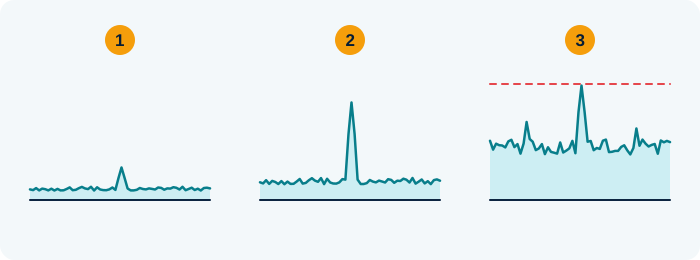
- Gain too low: you can barely see the signal
- Right gain: the signal stands out above the hiss
- Gain too high: everything rises and “ghost” signals appear
Raise the gain while the signal improves; when the hiss rises too, step back once.
Teaching illustration created by RadioMeteo.
Common mistakes to avoid
- Chasing the fullest waterfall: more visible traces do not mean more signals that can be heard.
- Always using maximum gain: additional gain can reduce the available headroom before overload.
- Confusing DSP and RF filters: the former does not necessarily protect the receiver input.
- Installing ferrites without diagnosing the problem: the result depends on frequency and the path taken by the unwanted current.
- Making the filter too narrow: a signal can become unintelligible because part of its modulation is excluded.
- Assuming every peak is a real transmission: images and intermodulation can produce apparently credible signals.
Frequently asked questions
Is a small antenna better than a large, noisy antenna?
It depends on the environment and the receiver. If the large antenna brings in a lot of noise or strong signals that cause overload, a smaller or more selective solution may provide better listening.
Does higher gain always improve weak signals?
No. It can make weak signals more visible, but it reduces the available margin when strong signals are present and can cause compression or intermodulation.
Does a software filter eliminate overload?
Not necessarily. A software filter processes the data after sampling; a strong signal may already have overloaded the front end. In such cases, an external RF filter should be considered.
Why can I see a signal but hear no audio?
The peak may be a spurious product, or the mode, frequency, squelch or filter bandwidth may be incorrect. Reducing the gain and changing the demodulation mode can help distinguish between these cases.
How can I tell whether the problem is the antenna or the receiver?
Compare the antenna, gain and listening source. If the phenomenon changes with the antenna, it may be related to RF energy or noise being picked up; if it changes mainly with the gain, overload should be considered.