📌 IN SHORT
- WSJT-X showed «Protocol error» with the FTDX10 because it shared the CAT The link that lets a computer control the radio. port with Log4OM through a VSPE splitter.
- The splitter copies every radio reply to every program: WSJT-X received the replies meant for Log4OM.
- The fix: a single middleman, OmniRig, which queues the commands from WSJT-X and Log4OM.
- It also applies to other Yaesu, Kenwood, Icom and Elecraft radios supported by OmniRig.
- If «Port is not available» appears after the change, unplug and reconnect the USB cable.
If you use the FTDX10 with several programs at once, for example WSJT-X for FT8 A digital mode: the computer sends and receives short messages even with very weak signals. and Log4OM as your logbook, sooner or later you need to share the radio’s CAT port. In my shack I tried a virtual port splitter (VSPE): Log4OM worked perfectly, while WSJT-X kept showing «Rig control error». Here is the whole story: the error, how to read it, why it happened and the final setup that now runs without errors. The screenshots come from the Italian version of the software.
The symptom: «Rig control error»
The station was set up like this: the FTDX10 connected to the PC by USB, which creates the CAT The link that lets a computer control the radio. port COM3. VSPE (Virtual Serial Ports Emulator) took the data from COM3 and shared it on two virtual ports: COM5 for Log4OM and COM6 for WSJT-X.
Log4OM read frequency The “channel” a station transmits on. and mode with no problem. WSJT-X, after a few seconds, showed this window:
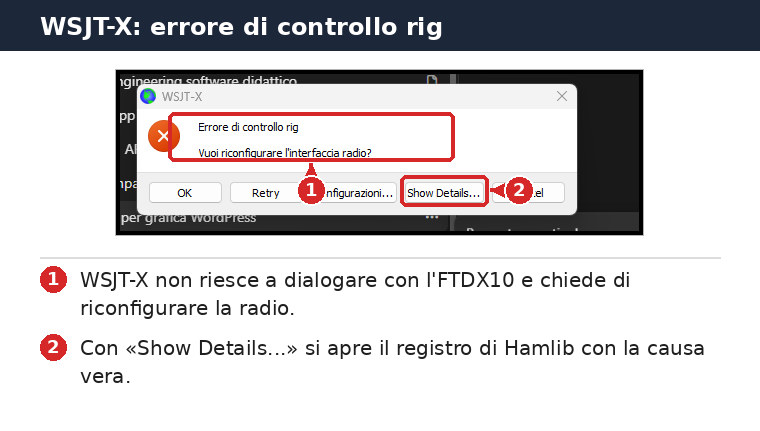
Reading the Hamlib log
The generic message says little. The real cause is in the details: WSJT-X talks to the radio through the Hamlib library, which logs every command sent and every reply received.
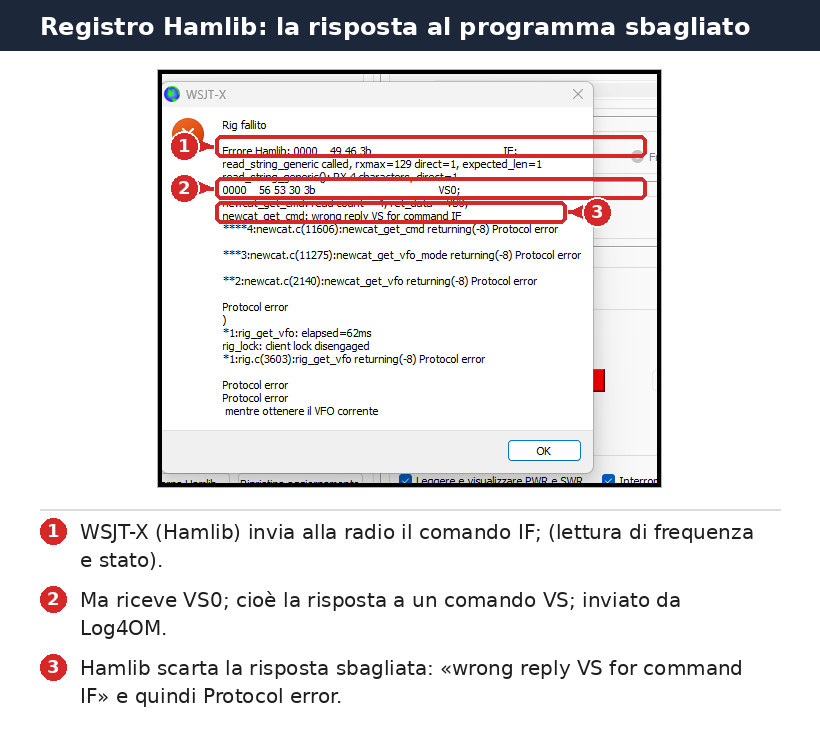
- WSJT-X sends the FTDX10 the
IF;command, asking for frequency The “channel” a station transmits on. and status. - It receives
VS0;, which is the reply to theVS;command (which VFO is selected). - Hamlib notices the mismatch («wrong reply VS for command IF») and stops with a Protocol error.
But WSJT-X never sent VS;. Log4OM did.
Why a splitter is not enough
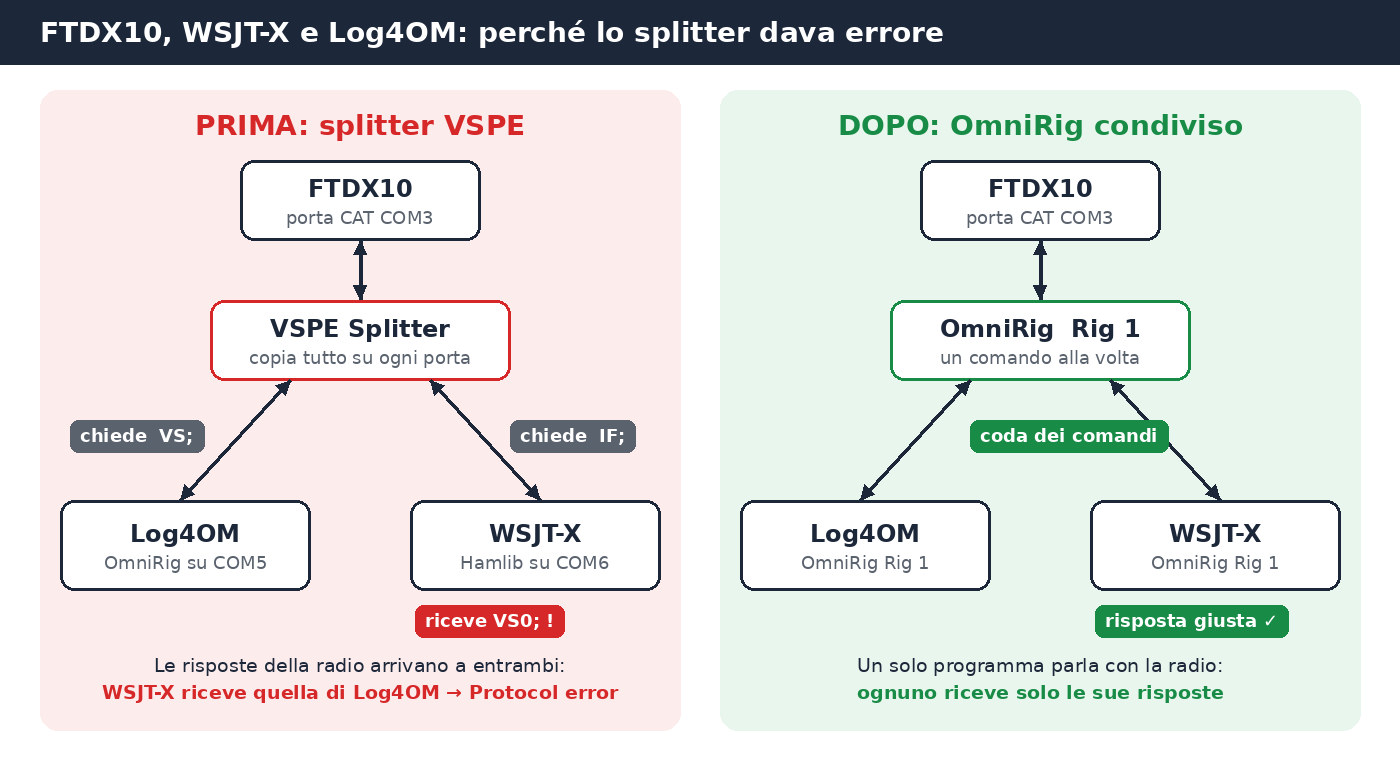
The VSPE splitter does one simple thing: everything coming from the radio is copied to every virtual port. Both WSJT-X and Log4OM poll the radio continuously, several times per second. The FTDX10 answers in order, but the splitter does not know which program each reply belongs to, so it delivers it to all of them.
Log4OM tolerates «foreign» replies and ignores them. Hamlib, used by WSJT-X, is strict: as soon as a reply does not match the command it sent, it stops with an error. That is why one program worked and the other did not.
First attempt: tuning VSPE
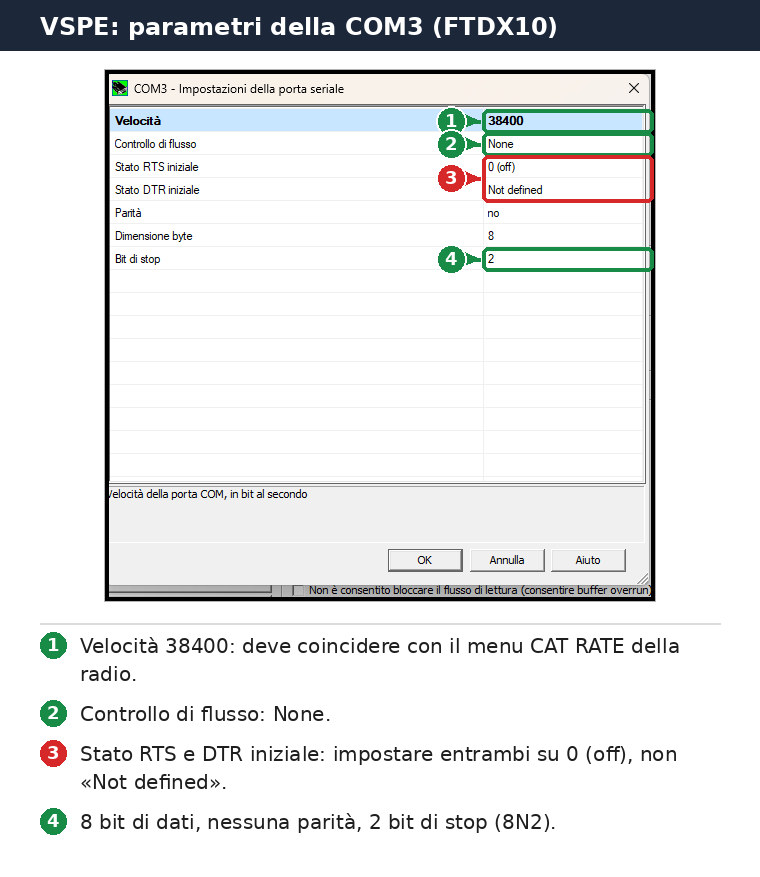
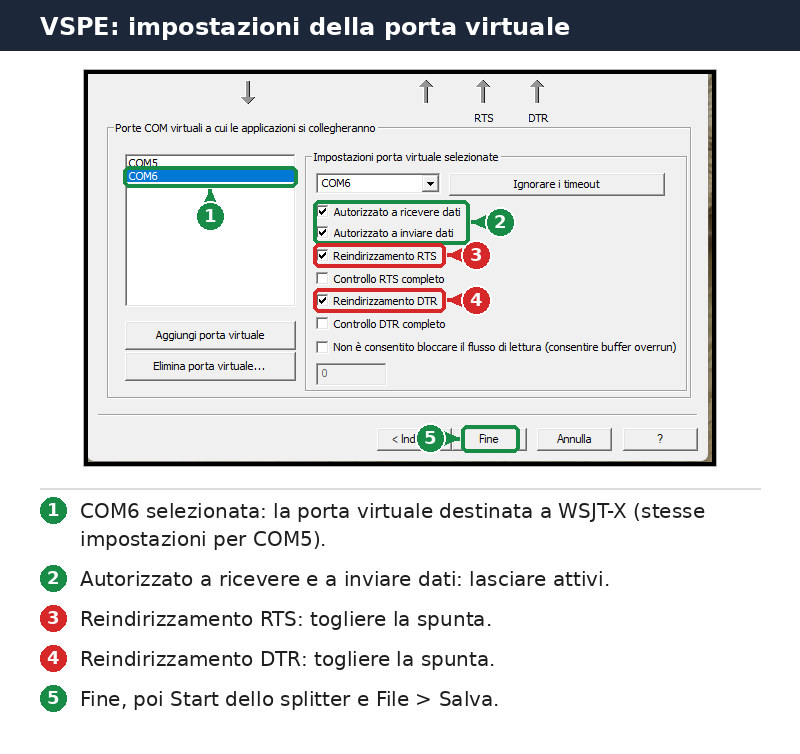
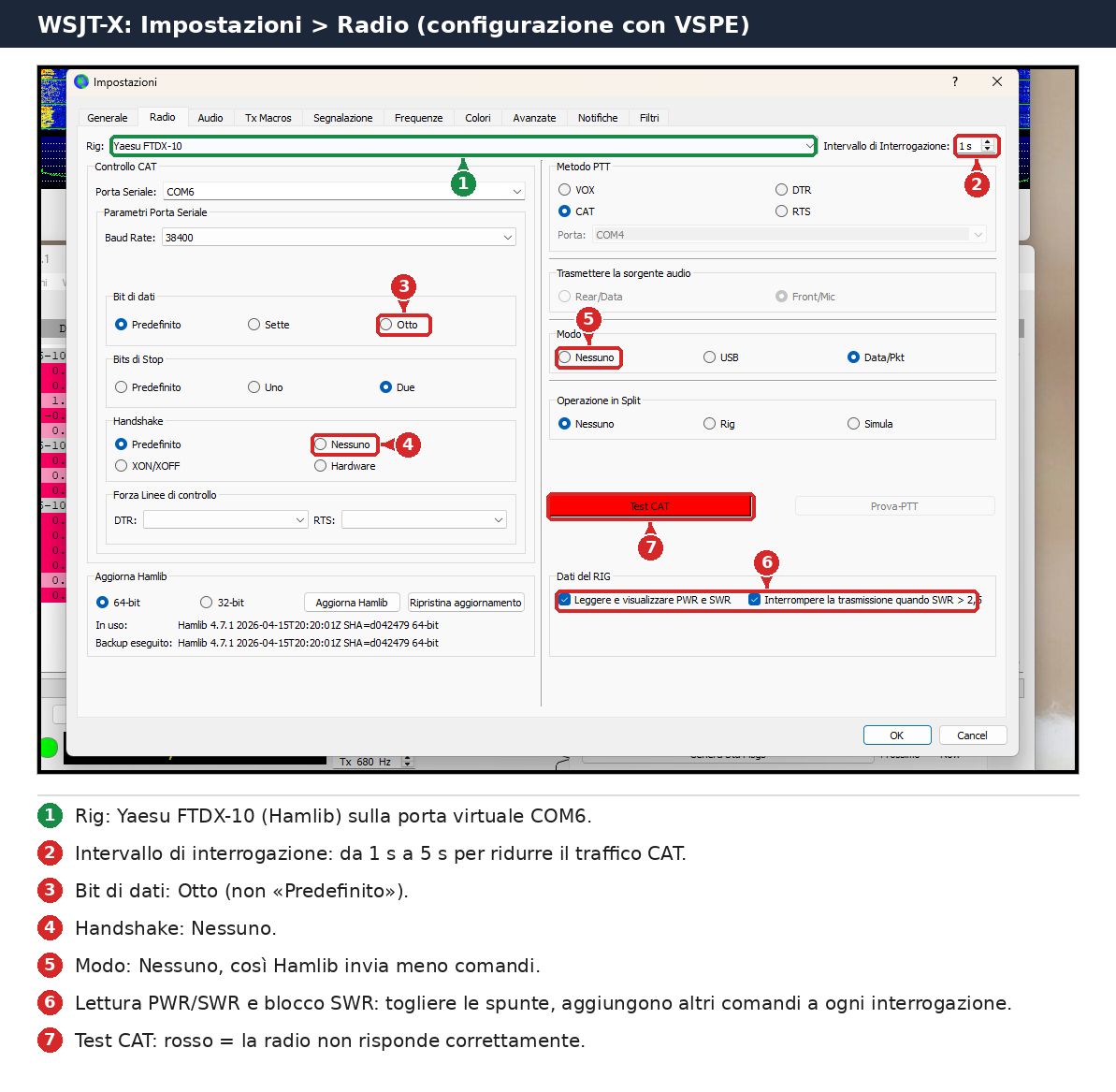
Before changing approach I tried to reduce collisions by tuning every setting. These are useful if you want to keep using a splitter.
The splitter
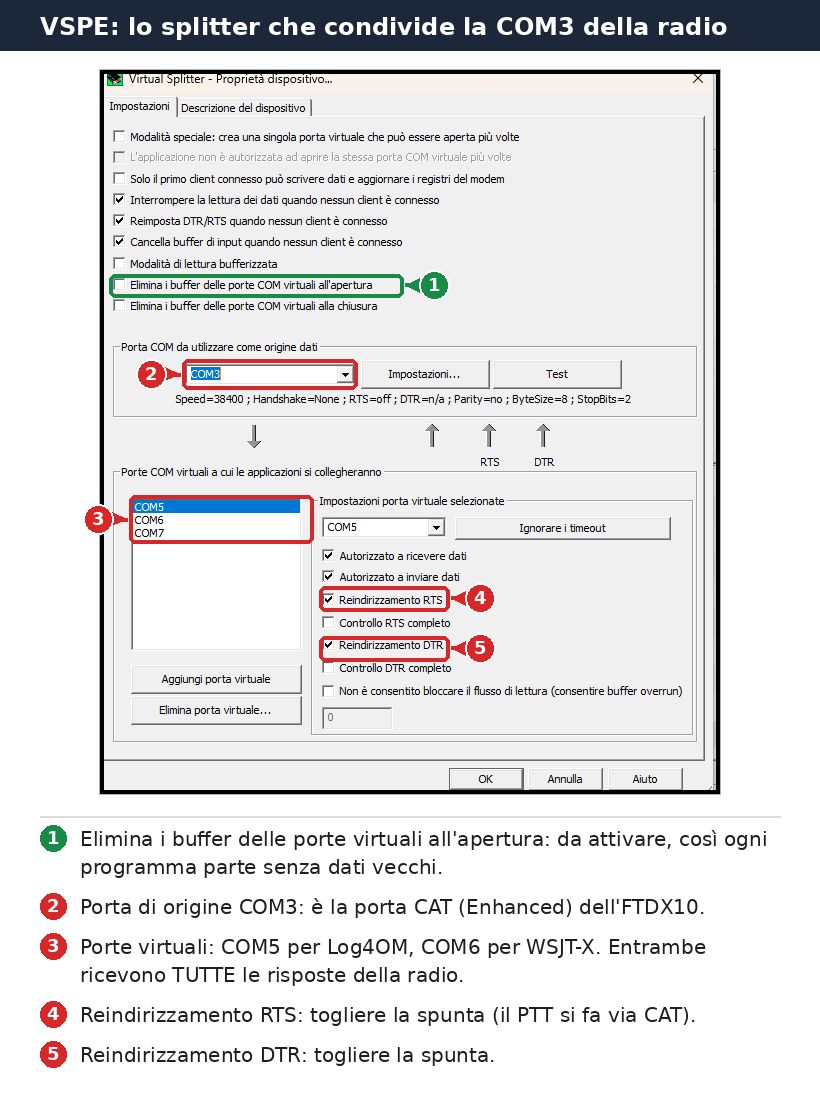
COM3 parameters
Virtual ports
WSJT-X
⚠️ Warning
The «Read and display PWR and SWR A number that tells you whether the antenna and radio “get along”: the closer to 1, the better.» and «Stop transmitting when SWR > 2.5» boxes make WSJT-X send extra commands at every poll. With a splitter they multiply collisions.
With these settings errors become rarer but do not disappear: as long as two programs poll the radio through a splitter, sooner or later a reply reaches the wrong program.
The acid test
To confirm the diagnosis I closed Log4OM and left only WSJT-X running. Result: no errors, frequency The “channel” a station transmits on. read correctly, band A group of nearby frequencies used for the same purpose, like a lane on a motorway. in sync and FT8 A digital mode: the computer sends and receives short messages even with very weak signals. transmission on 10 metres.
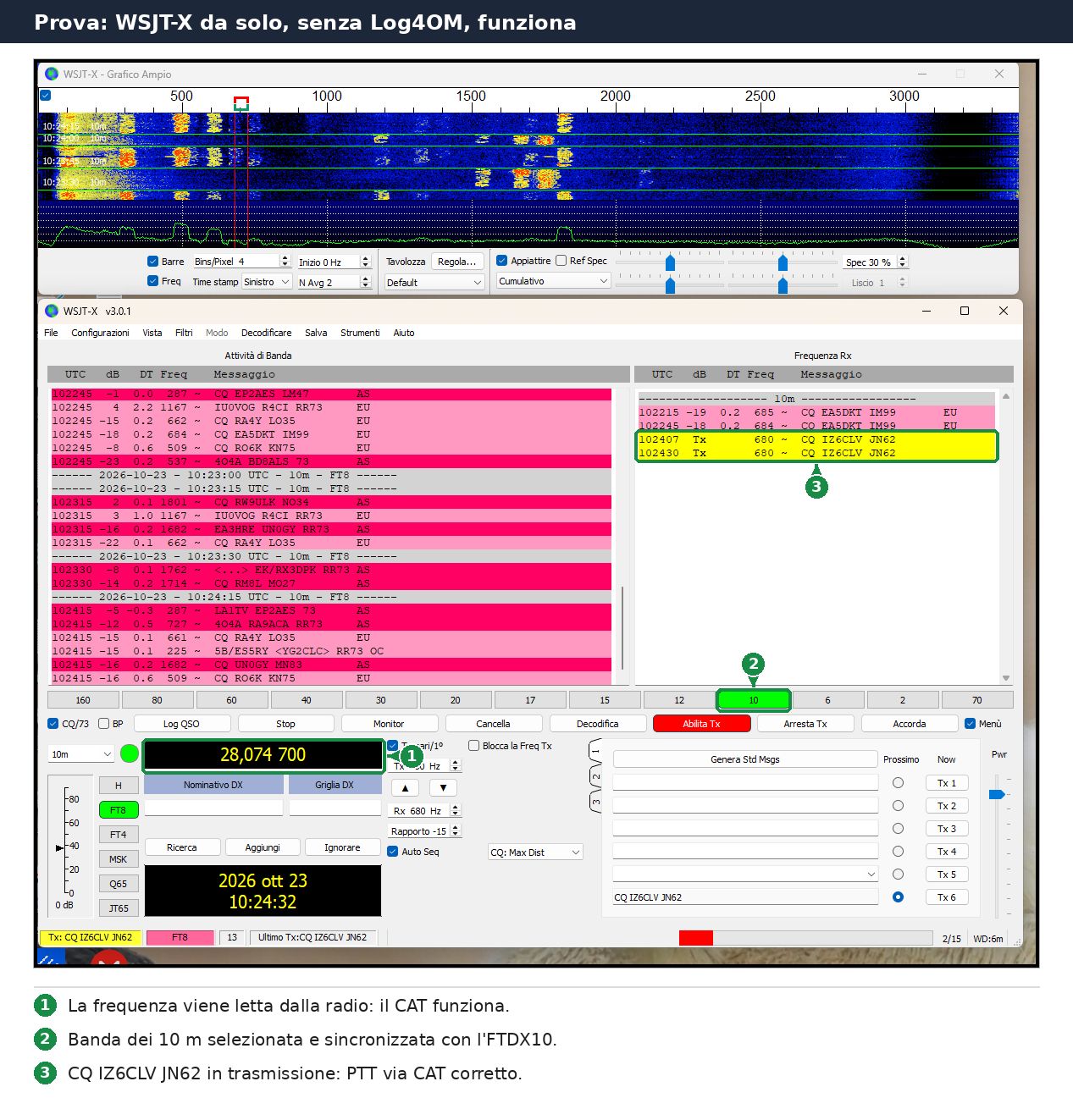
Radio, cable and port were fine. The only problem was sharing the CAT The link that lets a computer control the radio. port.
The solution: OmniRig for everyone
In my station Log4OM already used OmniRig, the free program that sits between the radio and your software (setup is covered in Yaesu FTDX10 and Log4OM: How to Configure CAT via USB with OmniRig). It was, however, attached to the splitter’s virtual COM5.
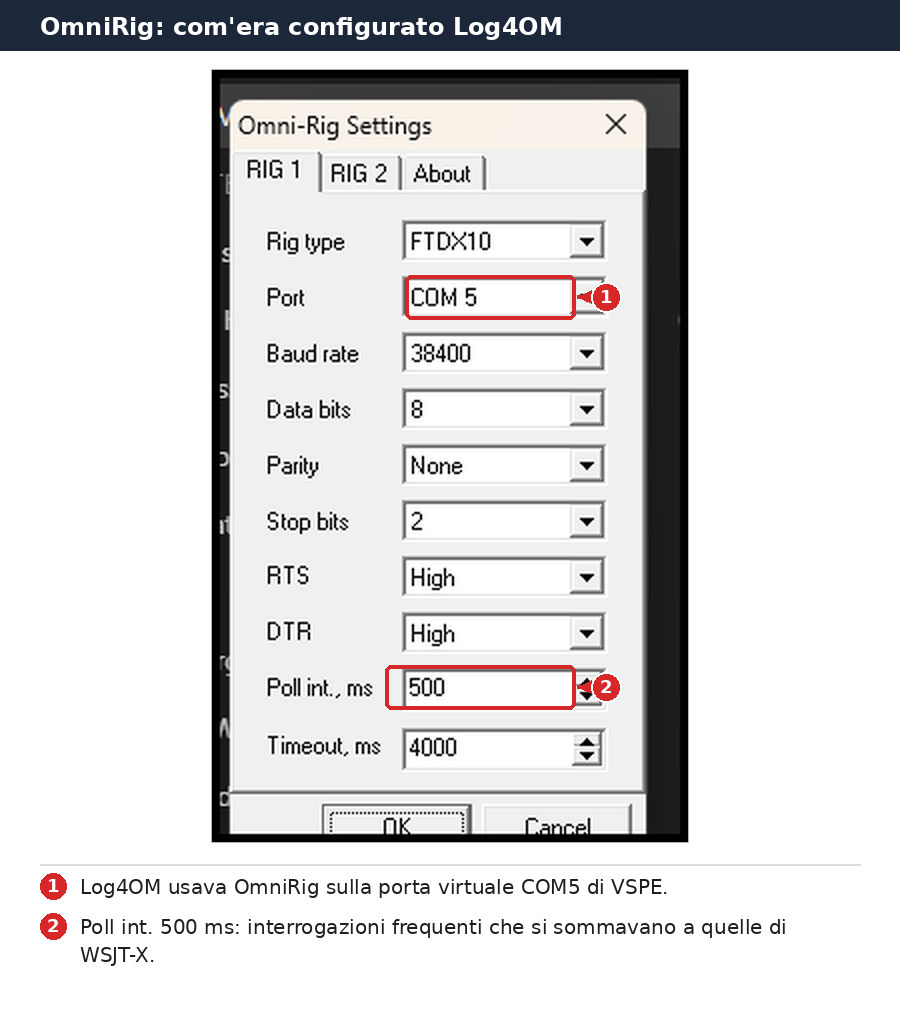
OmniRig has one key feature: only one program talks to the radio. It collects requests from every connected application, queues them and returns each one only its own reply. Both WSJT-X and Log4OM support it directly, so the splitter is no longer needed.
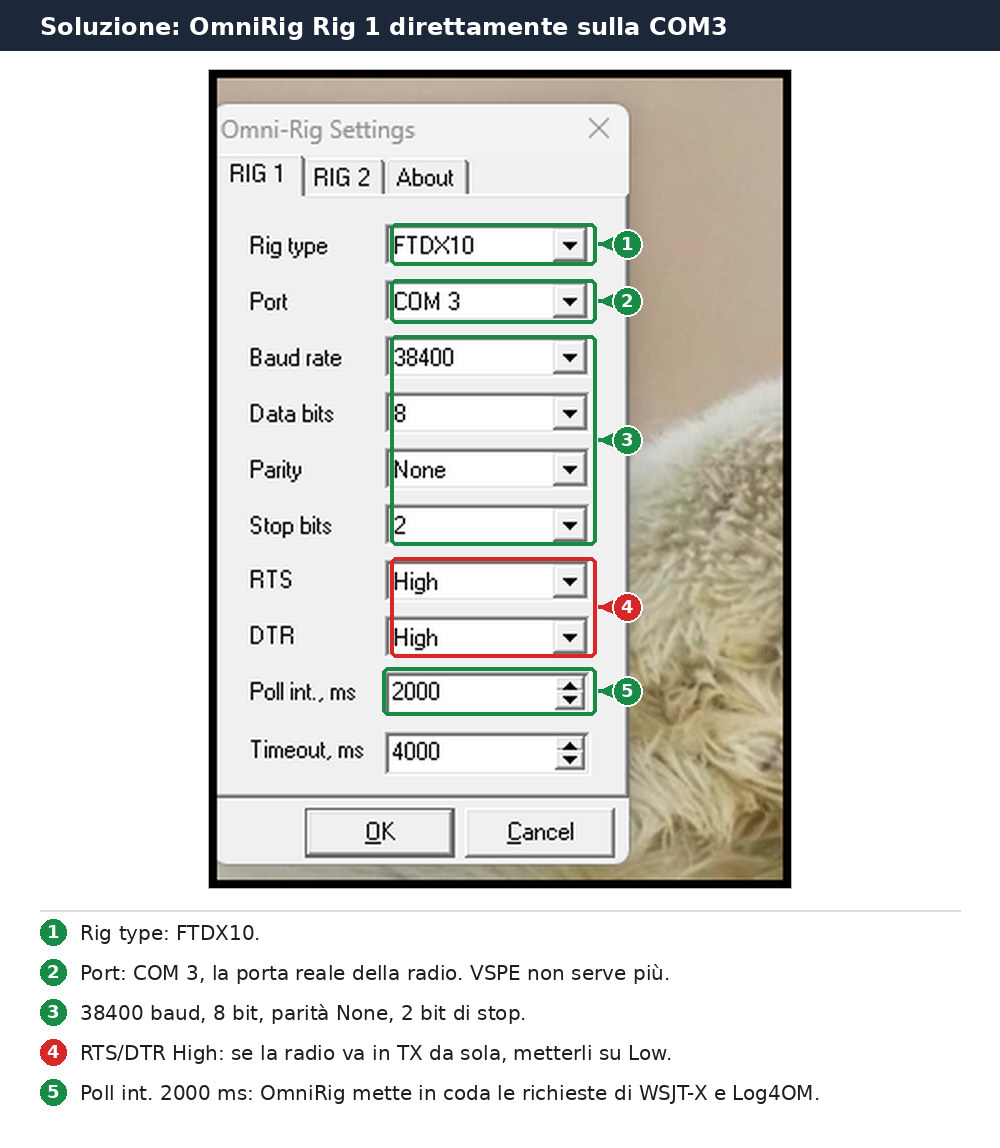
- Close VSPE and remove it from Windows startup, so COM3 stays free.
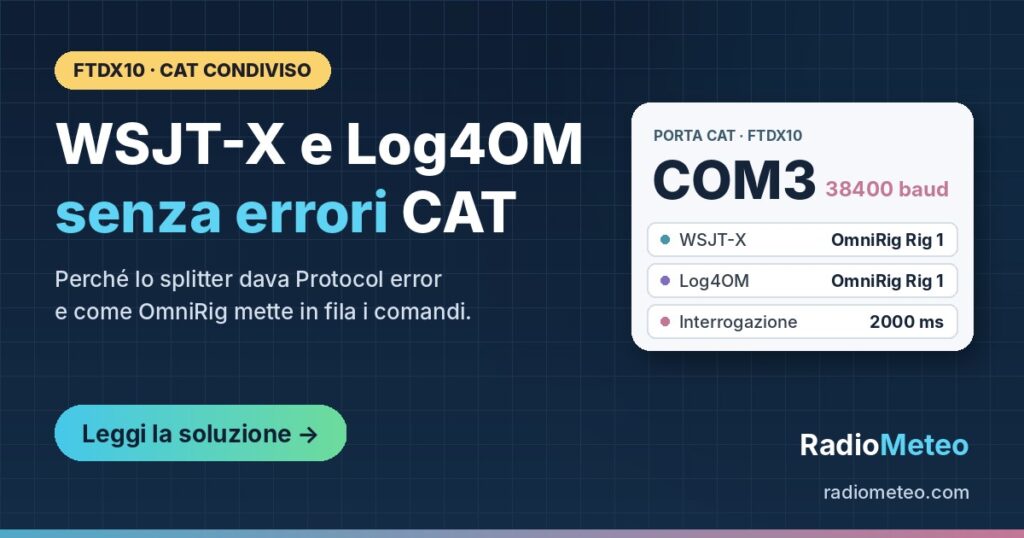
- OmniRig, RIG 1 tab: Rig type FTDX10, Port COM 3, 38400 baud, 8 bits, parity None, 2 stop bits, Poll int. 2000 ms.
- WSJT-X, Settings > Radio: Rig «OmniRig Rig 1», PTT The push-to-talk button you press to transmit. CAT The link that lets a computer control the radio., Mode None, split Listening on one frequency and transmitting on another to avoid confusion. Fake It. Then Test CAT.
- Log4OM: CAT interface OmniRig, Rig 1.
The last hurdle: «Port is not available»
On the first start, however, WSJT-X showed a different error:
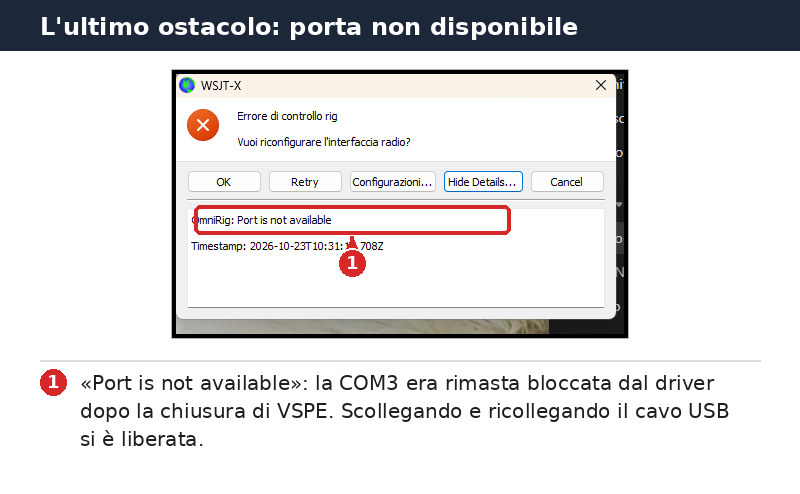
OmniRig was correctly set to COM3 and Rig 1, and VSPE was closed, yet the port was reported busy. Closing VSPE while it held COM3 open had left the radio’s USB driver with the port «stuck», even though no program was using it.
The fix was simple: unplug and reconnect the USB cable between radio and computer. The driver restarted, the port was released and since then WSJT-X and Log4OM run together with no errors.
💡 Tip
If OmniRig or WSJT-X say the port is not available and nothing is using it, unplug and reconnect the USB cable, or restart the PC, before changing any setting.
Does it apply to other radios?
Yes. The problem is not the FTDX10 but the way CAT The link that lets a computer control the radio. works: any radio controlled by two programs through a splitter risks the same mix-up of replies.
- Recent Yaesu radios (FTDX101, FTDX10, FT-710, FT-991A and similar): they use text commands such as
IF;andVS;, so the Hamlib error is identical. - Kenwood and Elecraft: the CAT protocol is very similar, same behaviour.
- Icom (CI-V): the messages differ, but two programs polling the radio at once can still mix up replies.
- Other software pairs: N1MM Logger+, JTDX, fldigi or GridTracker instead of WSJT-X and Log4OM hit the same problem when they share the port through a splitter.
The OmniRig fix works for every radio OmniRig supports: Yaesu, Kenwood, Icom, Elecraft, Ten-Tec and several SDR A radio where most of the work is done by software on a computer. receivers. Newer models may need the matching .ini file from the official OmniRig page. Only the rig type and port settings change, and they must match your radio’s CAT menu.
OmniRig runs on Windows only. On Linux and Mac the same idea works with Hamlib’s rigctld or with flrig: one program opens the radio port and the others connect to it.
Final setup at a glance
- FTDX10, CAT The link that lets a computer control the radio. menu: CAT RATE 38400, CAT TOT 100 ms, CAT RTS OFF. COM3 is the Enhanced port created by the USB cable.
- VSPE: no longer needed; close it and remove it from startup.
- OmniRig Rig 1: FTDX10, COM3, 38400, 8N2, Poll int. 2000 ms.
- WSJT-X: Rig «OmniRig Rig 1», PTT The push-to-talk button you press to transmit. CAT.
- Log4OM: CAT via OmniRig Rig 1.
⚠️ Safety
With OmniRig connected directly to the radio, the RTS and DTR lines really reach the FTDX10. If the radio ever keys up by itself, set RTS and DTR to Low in OmniRig.
To pass QSOs from WSJT-X to Log4OM see also How to Configure WSJT-X and Log4OM for FT8.
The moral: when two programs must control the same radio, duplicating the serial port is not enough. You need something that queues the questions and hands each program its own answer. OmniRig does exactly that, and it is free.
Sources and further reading
- OmniRig, official page and rig .ini files (DX Atlas)
- WSJT-X, official user guide
- Log4OM, official site and manuals
Good FT8 A digital mode: the computer sends and receives short messages even with very weak signals. QSOs!
73 de IZ6CLV