Setting up Winlink A system for sending email by radio. with VARA A program that sends data by radio, used with Winlink. HF Shortwave, between 3 and 30 MHz, which can reach the other side of the world. and FM A way of sending a voice by changing the frequency slightly. is not simply a matter of connecting a USB cable and launching the software. The chain includes the radio, audio, PTT The push-to-talk button you press to transmit., optional CAT The link that lets a computer control the radio., VARA modem and Winlink client: each element can operate independently of the others.

- CAT: the PC reads and changes frequency and mode
- PTT: the PC tells the radio when to transmit
- Audio: sound goes back and forth between PC and radio
If one works, it doesn’t mean the others do: test them one by one.
Teaching illustration created by RadioMeteo.
This distinction helps solve the most common problems: working PTT but no frequency The “channel” a station transmits on. control, audio present but no gateway decoding, the wrong COM port, or software installed without a reachable gateway. The correct procedure therefore starts with the radio mode and the services available in your area.
First choice: HF, VHF/UHF, packet or ARDOP?
VARA A program that sends data by radio, used with Winlink. HF Shortwave, between 3 and 30 MHz, which can reach the other side of the world. is the modem intended for connections on the HF bands, while VARA FM A way of sending a voice by changing the frequency slightly. is designed for VHF The frequencies between 30 and 300 MHz, home to FM radio and aircraft, for example./UHF FM connections. They are not two alternative settings for the same modem: they are separate components and must be matched to the gateway and mode that are actually available.
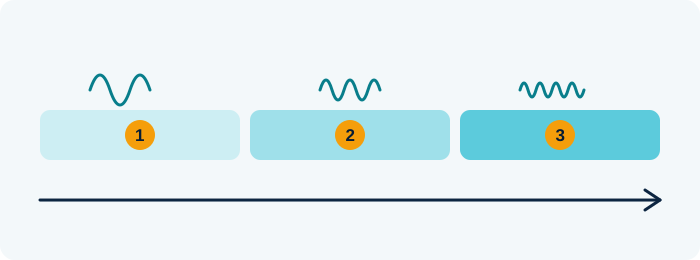
- HF (short waves, 3–30 MHz): can bounce around the world
- VHF (30–300 MHz): travels almost in a straight line, local range
- UHF (300–3000 MHz): even shorter waves, repeaters and cities
Teaching illustration created by RadioMeteo.
Before buying cables or changing the configuration, it is worth checking:
- which mode is supported by the gateway you intend to reach;
- whether the gateway can actually be reached from the operator’s location;
- which audio/PTT interface is compatible with the radio;
- whether CAT The link that lets a computer control the radio. control is needed for frequency The “channel” a station transmits on. and mode;
- whether the radio has a data jack suitable for the required bandwidth How much room a signal takes up across the frequencies..
VARA FM does not automatically replace packet. One area may have a packet gateway but no VARA FM gateway, or vice versa. The practical choice therefore depends on the local infrastructure, not just on the features advertised by the software.
The complete chain: what each component does
A typical setup looks like this:
Radio ⇄ USB audio/PTT interface ⇄ computer ⇄ VARA A program that sends data by radio, used with Winlink. modem ⇄ Winlink A system for sending email by radio. client
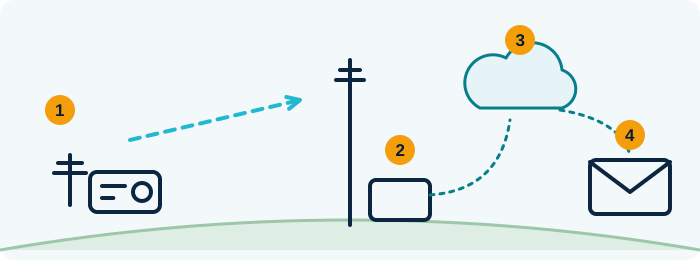
- Your radio with the Winlink program
- A gateway, a “bridge” station to the Internet
- The Internet
- The email reaches its destination
Teaching illustration created by RadioMeteo.
CAT The link that lets a computer control the radio. may also be added to this chain. CAT is the control connection between the computer and the radio. When supported and correctly configured, it allows parameters such as frequency The “channel” a station transmits on. and mode to be controlled. It is not the same thing as USB audio and does not, by itself, guarantee PTT The push-to-talk button you press to transmit..
| Element | Function |
|---|---|
| Radio | Receives and transmits the RF signal. |
| USB audio | Carries audio between the radio and computer. |
| PTT | Commands the radio to switch to transmit. |
| CAT | Provides radio control when supported by the model and configuration. |
| VARA HF Shortwave, between 3 and 30 MHz, which can reach the other side of the world. or VARA FM A way of sending a voice by changing the frequency slightly. | Modulates and demodulates the digital connection. |
| Winlink client | Handles the Winlink session and messages. |
A single USB connection may expose several devices, or only the audio interface. In other cases, the interface provides a separate serial port for CAT or PTT. For this reason, do not assume that “USB” automatically means audio, CAT and PTT are all available.
Setting up Winlink with VARA HF
For HF Shortwave, between 3 and 30 MHz, which can reach the other side of the world. operation, the radio must be set up for the digital mode required by the configuration. The computer must then use the correct USB audio device for both input and output.
Recommended sequence
- Connect the radio and interface using the cabling specified for that model.
- Identify the audio devices and any serial ports created by the interface in the operating system.
- Start VARA A program that sends data by radio, used with Winlink. HF and select the correct audio devices.
- Configure the available PTT The push-to-talk button you press to transmit. method: CAT The link that lets a computer control the radio., serial port, RTS/DTR, VOX or dedicated interface, depending on the radio and hardware.
- Set the VARA HF modem and its local connection in the Winlink client.
- Check reception, PTT and CAT separately before attempting a complete session.
VARA communicates with the client through a local TCP connection. For the configuration described here, Winlink’s cross-platform documentation specifies port 8300 for VARA HF and port 8302 for VARA FM. These values should be understood within the documented configuration and not confused with a CAT port or a computer serial port.
Setting up VARA FM for VHF and UHF
With VARA FM, the critical point is distinguishing the audio/PTT connection from the actual availability of a VARA FM gateway. A radio may transmit correctly and still receive no response if the gateway cannot be reached, the mode does not match, or the signal cannot be decoded.
Data jack and bandwidth
The radio’s data jack must be compatible with the required type of audio. Using a 1200 baud connection may limit the audio bandwidth; VARA FM at 9600 requires a radio and data connection that support that bandwidth.
Simply selecting a speed in the software is therefore not enough. The radio, data jack, interface and cabling must all be compatible. A connection designed for 1200-baud packet does not automatically become suitable for a wider-bandwidth configuration.
Available PTT methods
PTT can be provided in several ways:
- via CAT, when supported by the radio and software;
- via RTS/DTR on a serial port;
- via a PTT line on the audio interface;
- via VOX, when appropriate for the configuration;
- via a dedicated interface.
Digirig and similar interfaces should not be treated as universal solutions. The correct wiring depends on the radio model, the available connections and the selected PTT method. A handheld radio, a mobile transceiver and a radio with an integrated audio interface may all require different connections.
CAT, COM port and PTT: three separate checks
One of the most common mistakes is treating the USB connection as a single block. It is more effective to perform three separate tests.
1. Check the CAT port
Identify which serial port has been assigned to radio control. If the interface creates multiple ports, the one used for audio or PTT is not necessarily the same one used for CAT.
The radio model, serial speed and other parameters must match the transceiver configuration. An incorrect port or speed can prevent frequency control even when the audio works.
2. Check the PTT
Test PTT without assuming that it depends on CAT. It may work through an interface line, RTS/DTR, CAT or VOX. If the radio switches to transmit but the client cannot read or change the frequency, the problem is probably in the CAT path, not the PTT.
3. Check the audio
If the radio receives but VARA shows no useful activity, check the selected input device. If the radio transmits without being decoded, check the output device, audio level and compatibility between the interface and data jack.
Testing each function separately avoids changing the COM port, PTT method and audio levels at the same time, which makes it difficult to determine which change fixed or worsened the problem.
Adjusting audio without overmodulation
An apparently correct level in the software window does not prove that the RF signal can be decoded by the gateway. Audio should also be checked on the radio side and, when possible, with a second radio or the tools specified in the transceiver manual.
A cautious adjustment can follow this approach:
- explicitly select the correct USB audio device;
- start with moderate levels;
- activate PTT without unnecessarily prolonging the transmission;
- use VARA’s adjustment functions when available;
- monitor the radio’s ALC and avoid excessive drive;
- check the received signal with a second radio or the gateway, if possible.
Audio that is too low may not be decodable. Excessive or distorted audio can produce a transmission that sounds strong but is unusable. The goal should therefore be a clean signal, not the highest possible level.
When the gateway does not respond
Failure to connect does not necessarily indicate a VARA fault. Before changing levels or reinstalling the software, check:
- correct mode: VARA HF, VARA FM or packet;
- frequency and radio settings consistent with the gateway;
- whether the gateway can actually be reached from the operator’s location;
- antenna, power and link conditions;
- transmit audio is not distorted;
- audio is being received by the correct device;
- PTT remains active for the required duration;
- CAT is configured on the correct serial port, if used.
The fundamental difference is between transmitting and being decoded. PTT may work perfectly, but an incorrect level, incompatible bandwidth or unavailable gateway can still prevent the connection.
Using Winlink and VARA on Linux or macOS
Outside Windows, there is no single equivalent configuration. The Winlink client, VARA modem and radio control must be considered separately.
Linux
Winlink’s official documentation describes using Pat as a cross-platform client, with VARA run through Wine or compatible environments and radio control provided, when necessary, by Hamlib or rigctld.
The advantage is that the components are separated: Pat handles the client, VARA serves as the modem, and Hamlib or rigctld can handle radio control. This flexibility requires audio, serial ports, PTT and CAT to be checked separately.
macOS
MacWinlink is available for macOS as a native client that can use VARA HF and VARA FM installed and managed through WINE, according to the project documentation.
Here too, the client and modem remain separate components. Having a macOS client does not remove the need to configure VARA, the audio interface and radio control correctly.
Alternatives to VARA
If the local gateway does not support VARA, or the available hardware is already set up for another mode, the following options can be considered:
- packet with a hardware TNC;
- Soundmodem or Direwolf;
- ARDOP and other transports supported by the client and available infrastructure.
The choice should be based on four factors: reachable gateways, existing hardware, compatible bandwidth and ease of troubleshooting. Changing modems is not useful if the real limitation is coverage or the lack of a suitable gateway.
Testing checklist
- Is the radio set to the correct mode?
- Is the selected USB audio device the one actually connected to the radio?
- Has PTT been tested separately?
- Is the CAT port the correct one?
- Does the serial speed match the radio’s requirements?
- Are input and output audio levels adjusted without distortion?
- Is the data jack compatible with the required bandwidth?
- Does the selected VARA modem match the band and gateway?
- Is the Winlink client communicating with VARA over the expected local connection?
- Is there a genuinely reachable gateway?
Only after these checks should you attempt a complete session. Working through the system one block at a time reduces random troubleshooting and makes it clear whether the problem lies in the computer, interface, radio or RF link.
Frequently asked questions
Does VARA FM work with any VHF or UHF radio?
No. You need a radio, interface and cabling compatible with audio and PTT. A reachable VARA FM gateway must also be available.
If PTT works, is CAT configured correctly?
No. PTT and CAT are separate functions. PTT may operate through an interface, RTS/DTR, VOX or CAT, while radio control may require a different port and serial parameters.
Can a radio connected with a single USB cable be used?
It depends on the model and interface. A USB cable may provide audio, CAT, PTT or a combination of these functions, but this should not be assumed without checking the exposed devices and the radio manual.
Is Pat an alternative to VARA?
No. Pat is a Winlink client. VARA is the modem and must be configured separately, including when it is used through Wine or CrossOver.
Why can I hear or transmit audio while the gateway does not respond?
Possible causes include audio that is too low or distorted, the wrong mode, incompatible bandwidth, an unreachable gateway, or incomplete CAT/PTT configuration.