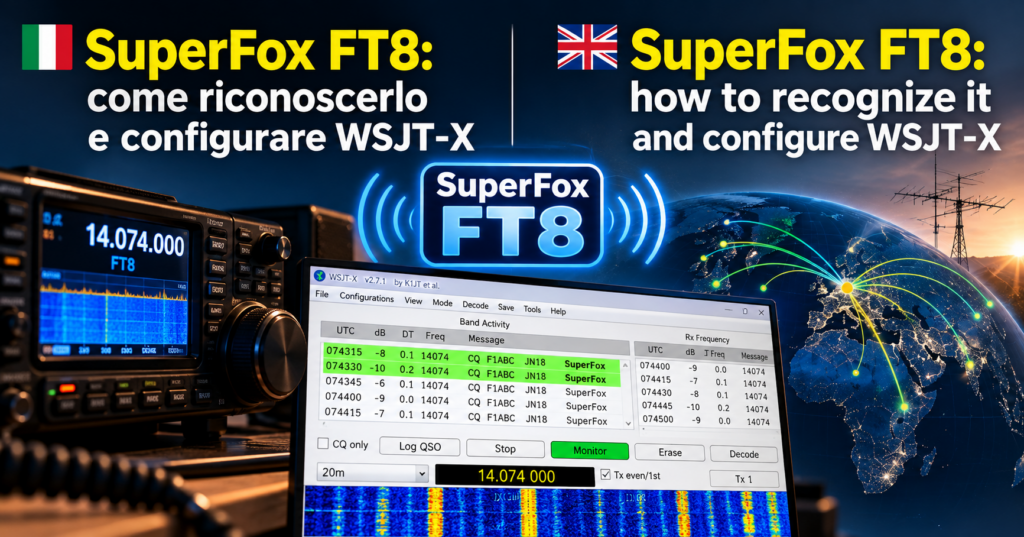
When a DXpedition uses SuperFox, the received signal does not behave like ordinary FT8 A digital mode: the computer sends and receives short messages even with very weak signals. or the older Fox/Hound mode. Decoding it requires a version of WSJT-X with dedicated support, while operators calling the expedition must enable the SuperHound profile and use the OTP supplied by the Fox. The first check, therefore, is not trying random frequencies: you need to determine which mode is active and whether your software is compatible.
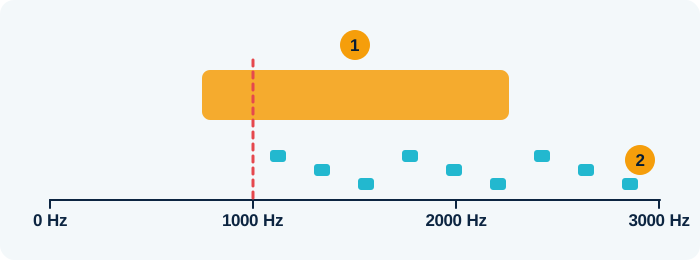
- The DXpedition (SuperFox) sends one signal about 1.5 kHz wide
- Callers (Hounds) transmit above 1000 Hz
Teaching illustration created by RadioMeteo.
SuperFox was introduced in the WSJT-X 2.7.0 series. The official releases page lists WSJT-X 3.0.2 as the stable release and WSJT-X 3.2.0-rc1 as the pre-release at the time of checking. For operating use, install the latest stable version available from the official page rather than relying on an old release candidate or software that decodes standard FT8 only.
What changes between FT8, Fox/Hound, and SuperFox
In ordinary FT8 A digital mode: the computer sends and receives short messages even with very weak signals., each station transmits an individual FT8 message. During a pile-up Lots of stations calling the same rare station at once., many stations may call within the same period, but the software treats each signal as a separate transmission.
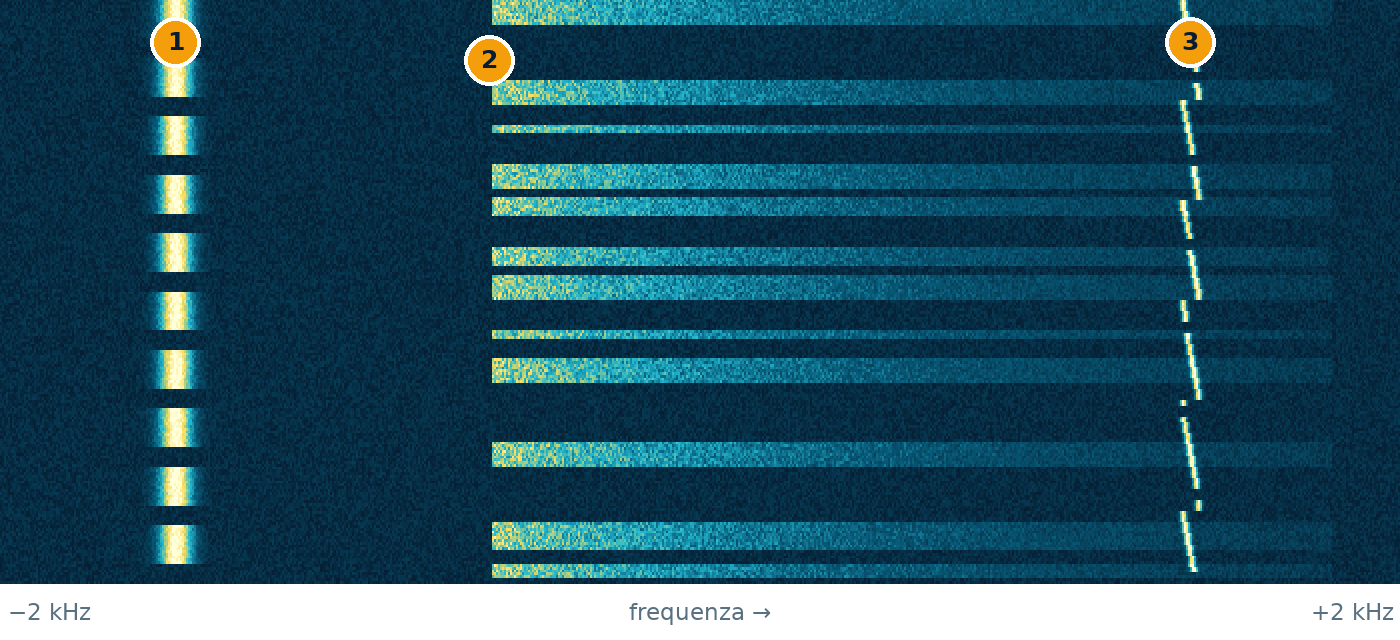
time ↓ · frequency →
- CW: a thin line that switches on and off: it is Morse code
- SSB voice: a band that lights up in bursts, following the syllables
- FT8: a tiny trace that hops between tones every 15 seconds
Teaching illustration created by RadioMeteo, not a real recording.
The traditional Fox/Hound mode changes how the pile-up is handled. The DX A contact with a very distant station. station, the Fox, coordinates replies from calling Hounds and can transmit multiple separate FT8 streams. The procedure requires specific settings and behavior different from ordinary FT8, especially when choosing the calling frequency The “channel” a station transmits on..
SuperFox uses a dedicated waveform instead. The Fox transmission has a constant envelope and occupies 1512 Hz. It can contain reports or RR73 messages intended for multiple Hounds at the same time. It is therefore not five ordinary FT8 signals placed side by side, spaced about 50 Hz apart.
The main difference concerns the DX station’s transmission. SuperHounds continue to send normal FT8 signals to the SuperFox. This distinction explains why an operator may still see some FT8 signals with older software without being able to interpret the expedition’s reply.
How to identify a SuperFox transmission
No single clue is always enough. The most reliable assessment comes from combining the DXpedition’s announcements, the appearance of the signal, and the information displayed by WSJT-X.
Check the DXpedition instructions
The first reference is the expedition’s operating plan. If the station explicitly announces that it is using SuperFox, do not automatically apply the old Fox/Hound rules. Check at least the synchronization frequency The “channel” a station transmits on., the expected passband, and whether an OTP is required.
A heavy pile-up Lots of stations calling the same rare station at once. on a DXpedition’s frequency does not by itself prove that SuperFox is active. Many expeditions may use ordinary FT8 A digital mode: the computer sends and receives short messages even with very weak signals. or traditional Fox/Hound. Treating every concentrated activity as SuperFox can lead you to select the wrong profile and transmit without having decoded the Fox.
Observe the signal width and behavior
A SuperFox signal appears much wider than a single FT8 carrier The basic radio wave that the information rides on.. The waveform occupies 1512 Hz, whereas a normal FT8 signal is narrow and appears as an individual event in the passband. The wide signal must still be found at the position specified by the expedition: a misplaced marker can prevent the decoder from synchronizing.
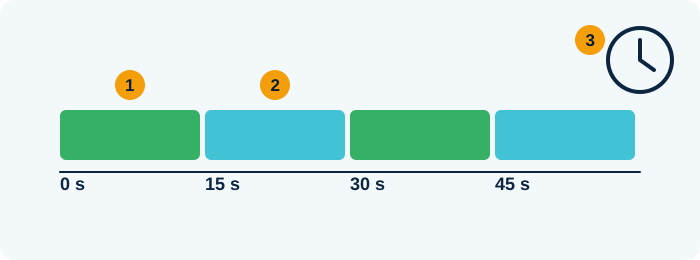
- First turn: one station transmits
- Next turn: the other answers
- The PC clock must be accurate, within about one second
Teaching illustration created by RadioMeteo.
The lowest SuperFox tone is normally 750 Hz. The official manual requires the green marker and the FTol parameter to match the synchronization frequency announced by the Fox. The frequency given by the expedition takes precedence over assumptions based on an earlier configuration.
Read the Band Activity window
When the decoder correctly recognizes the mode, the band A group of nearby frequencies used for the same purpose, like a lane on a motorway. Activity window displays SuperFox decodes in the expected format. In SuperHound mode, WSJT-X listens for SuperFox transmissions during even periods, those beginning at 00 and 30 seconds UTC, and for normal FT8 signals during odd periods.
This alternation is a useful check. If the program is configured as SuperHound but does not interpret the signal during even periods, first check the version, operating profile, synchronization frequency, and FTol setting. Increasing power or randomly moving the audio cursor is not enough.
Check the authentication status
SuperFox transmissions include a one-time password, or OTP. WSJT-X can check this element and mark the callsign as verified when the check succeeds. The verification helps distinguish an authenticated transmission from a spoofed callsign or a signal that cannot be traced to the legitimate Fox.
The OTP does not replace checking the DXpedition’s operating plan. The frequency, band, operating times, and callsign must be consistent with the expedition’s information.
Which version of WSJT-X to use
SuperFox requires a decoder that understands the mode’s specific waveform and payload. WSJT-X 2.6 and earlier versions are not suitable: depending on the version, they may handle ordinary FT8 A digital mode: the computer sends and receives short messages even with very weak signals. and earlier Fox/Hound functions, but they should not be considered compatible with SuperFox.
Support was added in the 2.7.0 series. Historical releases are useful for understanding when the feature appeared, but they are not the practical reference for a current installation. At the time of checking, the official releases page listed WSJT-X 3.0.2 as the stable release and WSJT-X 3.2.0-rc1 as the pre-release. The cautious choice is to use the latest stable release published by the official project.
The WSJT-X repository contains components dedicated to SuperFox, including files in the lib/superfox directory. This technical detail clarifies the nature of the change: it is not simply a graphical checkbox added to the traditional FT8 decoder.
Configuring WSJT-X as SuperHound
Configure the software after installing a compatible version. The manual specifies the following path through the Advanced tab:
- select Special operating activity;
- choose Hound;
- enable SuperFox mode;
- enter the OTP required for the expedition.
The name shown by the program should reflect the active profile. If it shows only Hound instead of SuperHound, the SuperFox checkbox has not been enabled or the command was not applied to the correct profile. The FT8 A digital mode: the computer sends and receives short messages even with very weak signals. button can also manage different profiles; a right-click may switch SuperFox behavior according to the program’s configuration.
Before transmitting, the receiver The device that “listens” to radio signals. must decode Turn the signal into text, pictures or sound you can understand. the SuperFox. Knowing the callsign is not enough, and seeing a wide signal on the waterfall A scrolling chart that shows signals as coloured stripes over time. is not enough either. The specified procedure is to double-click the correctly decoded Fox callsign. WSJT-X then prepares the SuperHound call using the received data.
Synchronization frequency, marker, and FTol
Place the green marker at the SuperFox synchronization frequency The “channel” a station transmits on.. The FTol parameter must cover the expected position without leaving the decoder outside the useful range. A marker that is too far away can create a false compatibility problem: the software is up to date, but it is looking for the signal in the wrong place.
The SuperHound can transmit in the 200 to 3000 Hz audio range, or in a wider range specified by the SuperFox, up to 5000 Hz. Transmitting above 1000 Hz is not required. WSJT-X also does not automatically shift frequency after a Fox reply. This is a practical difference from the historical instructions many operators associate with Fox/Hound.
Why older decoders are not enough
Older decoding software may continue to work well with ordinary FT8 A digital mode: the computer sends and receives short messages even with very weak signals.. It may also display signals and activity on the same band A group of nearby frequencies used for the same purpose, like a lane on a motorway.. That does not mean it can reconstruct a SuperFox transmission.
The Fox sends a wide waveform and content organized to serve multiple Hounds in the same transmission. The decoder must recognize that structure, extract messages intended for individual stations, and handle the OTP check. Software without specific support cannot be made compatible simply by changing the audio frequency The “channel” a station transmits on. or selecting Hound.
The most common symptom is apparently active traffic with no usable Fox decodes. The operator may see the signal on the waterfall A scrolling chart that shows signals as coloured stripes over time., read some ordinary FT8 calls, and conclude that the problem is the antenna. Before changing the station setup, check that the software belongs to a compatible series and that SuperHound has been selected.
Practical checks before calling
- Announced mode: confirm that the DXpedition is using SuperFox, and do not confuse it with ordinary FT8 A digital mode: the computer sends and receives short messages even with very weak signals. or traditional Fox/Hound.
- Version: use the latest stable WSJT-X release available from the official page; avoid versions earlier than the 2.7.0 series.
- Profile: check Advanced, Special operating activity, Hound, and SuperFox mode.
- OTP: enter the required code and check for any indication that the callsign has been authenticated.
- Synchronization: align the green marker and FTol with the frequency The “channel” a station transmits on. announced by the Fox.
- Decoding: wait for a valid SuperFox transmission before starting your call.
- Passband: transmit within the permitted range, without automatically applying the old shift above 1000 Hz.
If the signal remains undecodable, the most logical sequence is to start with the software and configuration. Installing a new version without configuring SuperHound will not solve the problem; enabling SuperHound with an older decoder will not solve it either.
Frequently asked questions
Is SuperFox a new type of FT8 also used by callers?
No. The special waveform applies to the Fox transmission. SuperHounds send normal FT8 A digital mode: the computer sends and receives short messages even with very weak signals. signals to the DX A contact with a very distant station. station.
What is the minimum required version?
Support is available from the WSJT-X 2.7.0 series onward. For current use, the latest stable version available is preferable to an old release candidate.
Do I have to transmit above 1000 Hz?
Not necessarily. The SuperHound can use the 200 to 3000 Hz range, or the wider range specified by the Fox. WSJT-X does not automatically shift frequency The “channel” a station transmits on. after the reply.
Can I call the Fox without decoding it first?
No. The specified procedure requires decoding the SuperFox first and then double-clicking the received callsign.
What does “verified” mean?
It means that WSJT-X successfully checked the OTP included in the transmission. It is an authentication check and should be used together with the DXpedition’s operating information.