The WSJT-X 3.0 update does not require rebuilding an FT8 A digital mode: the computer sends and receives short messages even with very weak signals. or FT4 station from scratch, but it changes some parts of the daily workflow. The 3.0 series affects the FT8 decoder, band A group of nearby frequencies used for the same purpose, like a lane on a motorway. selection, decoding filters and operating modes. The stable version listed by the project is WSJT-X 3.0.2, released on 18 June 2026. After installation, it is therefore useful to separate three areas: decoding, changes to the operating workflow, and anything related to CAT The link that lets a computer control the radio., PTT The push-to-talk button you press to transmit., UDP and external programs.

- CAT: the PC reads and changes frequency and mode
- PTT: the PC tells the radio when to transmit
- Audio: sound goes back and forth between PC and radio
If one works, it doesn’t mean the others do: test them one by one.
Teaching illustration created by RadioMeteo.
The release notes also list WSJT-X 3.2.0-rc1, dated 23 September 2026. This is a release candidate, not a replacement for the 3.0.2 General Availability release. When assessing a compatibility issue or comparing behaviour with the 2.7 series, this distinction prevents stable versions from being mixed with packages still under evaluation.
WSJT-X 3.0 update: which version is being used
The 3.0 series is not a single release. The official notes list WSJT-X 3.0.0 as released on 8 April 2026. Version 3.0.1 followed as a bug-fix release, with corrections covering CloudLog, macOS, callsign highlighting, some band A group of nearby frequencies used for the same purpose, like a lane on a motorway. limits and SWR A number that tells you whether the antenna and radio “get along”: the closer to 1, the better. display. Version 3.0.2 fixed further issues, including problems involving Ham Radio Deluxe, OmniRig and TCI.
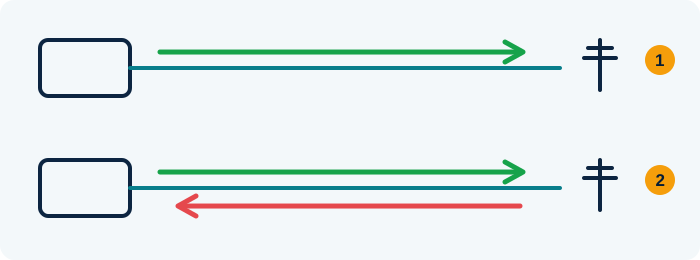
- Well-tuned antenna: almost all the energy goes out into the air
- Badly tuned antenna: part of the energy bounces back to the radio (high SWR)
An SWR meter measures how much comes back: the closer to 1:1, the better.
Teaching illustration created by RadioMeteo.
For this reason, version 3.0.2 should not be described as if it introduced every feature in the series by itself. The broader changes belong to 3.0.0; subsequent versions corrected the program’s behaviour and its integrations. The practical point is straightforward: anyone installing 3.0.2 is using the latest stable version listed on the official download page, with the accumulated fixes from the 3.0 series.
When troubleshooting a malfunction, it is useful to record at least the exact version, operating system and type of connection to the radio. A band-change problem through Ham Radio Deluxe, for example, does not show that the FT8 A digital mode: the computer sends and receives short messages even with very weak signals. decoder is faulty. These are different parts of the workflow.
What really changes when working with FT8 and FT4
The changes in the 3.0 series can be viewed on three levels. The first concerns decoder performance. The second concerns how decodes are displayed and how the operator decides to respond. The third concerns band A group of nearby frequencies used for the same purpose, like a lane on a motorway. commands and workflow automation across multiple frequencies. Mixing up these areas can lead to protocol changes being attributed to features that actually belong to the interface or station control.
FT8 decoding with parallel processing
WSJT-X 3.0 introduces an FT8 A digital mode: the computer sends and receives short messages even with very weak signals. decoding option with parallel processing across concurrent threads. The feature is intended to improve speed and computer resource usage. Under suitable conditions, it can reduce processing times, but it does not automatically mean greater radio sensitivity.
If the signal does not reach the computer correctly, audio levels are unsuitable or time synchronisation is insufficient, faster processing will not fix the problem at its source. The same applies to an incorrectly set audio frequency The “channel” a station transmits on. or a CAT The link that lets a computer control the radio. chain that selects the wrong band. Version 3 improves part of the software processing; it does not replace the station’s basic checks.
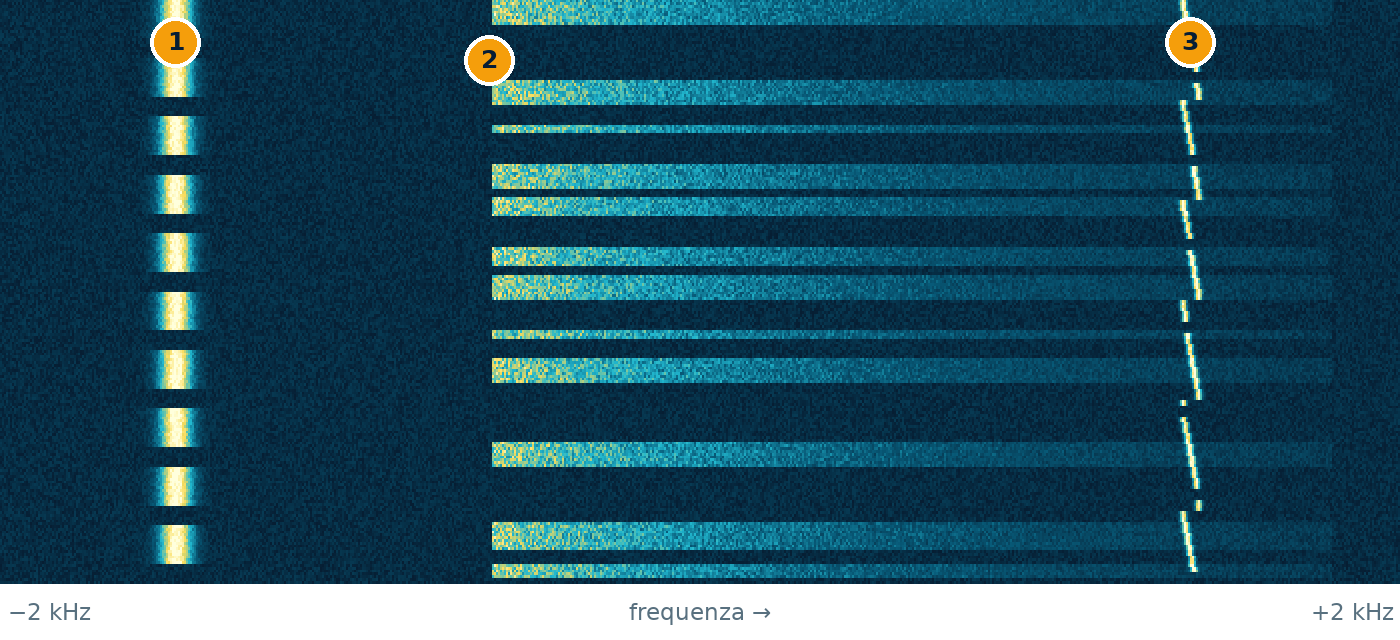
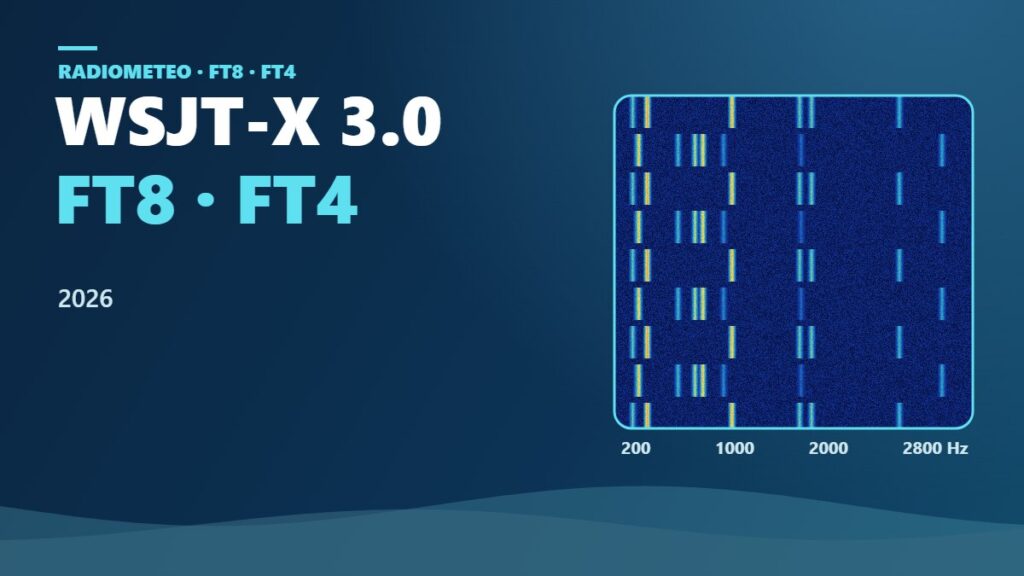
time ↓ · frequency →
- CW: a thin line that switches on and off: it is Morse code
- SSB voice: a band that lights up in bursts, following the syllables
- FT8: a tiny trace that hops between tones every 15 seconds
Teaching illustration created by RadioMeteo, not a real recording.
It is therefore not correct to expect more decodes in every configuration. The result depends on the computer, the signals present and the operating conditions. The official notes document the option and its performance focus, but do not guarantee the same improvement for every operator.
Filters, station replies and alerts
The 3.0 series adds filters for some categories of displayed decodes. This changes how the operator reads the window, without changing the content of the received signals. A filter can make operating more orderly when many calls are present, but it does not increase antenna capability or receiver The device that “listens” to radio signals. sensitivity.
The “Wait and Reply”, “Wait and Call” and “Wait and Pounce” options are also available. These modes organise station replies and operating behaviour during the QSO A radio contact between two stations.. They are most useful when the operator wants to follow a defined logic: wait for a reply, call, or react to an identified station.
Audio alerts add another element to the workflow. Here too, the change concerns activity handling, not the digital mode itself. FT8 and FT4 remain structured modes; the update changes how the program presents and manages some stages.
Band buttons and band hopping
The 3.0 series introduces single-click band buttons. Selection becomes more direct, but the result depends on correct communication with the radio. If CAT does not transfer the new frequency or an external program interferes with the command, the button does not fix the underlying problem.
The official notes also indicate support for band hopping with FT8, FT4 and MSK144. This expands the workflow across bands, but requires a consistent control chain: the software, radio and external connections must interpret commands correctly. It should not be confused with unrestricted automatic searching or with a guarantee of activity on every band.
Radio control: CAT, PTT, Hamlib, FLRig, OmniRig and TCI
After installation, it is worth checking the path from a WSJT-X command to the radio. The points to verify are the transceiver A radio that can both receive and transmit. model, CAT The link that lets a computer control the radio. port, speed where required by the configuration, PTT The push-to-talk button you press to transmit. method and any external interface. The frequency The “channel” a station transmits on. selected at startup and band A group of nearby frequencies used for the same purpose, like a lane on a motorway. changes should also be checked.
Version 3.0.2 includes fixes related to Ham Radio Deluxe, OmniRig and TCI. This shows that external integrations are part of the practical update experience. It does not mean, however, that every installation using one of these tools has an error, or that every problem belongs to WSJT-X. Behaviour may depend on the connection between the programs and on the radio in use.
WSJT-X can display transmitted power and SWR A number that tells you whether the antenna and radio “get along”: the closer to 1, the better. reported by the radio. The notes indicate support for most modern radios controlled through Hamlib or FLRig. The data must actually be supplied by the radio or interface, however: a missing or unreliable value cannot become a valid measurement through the program alone.
Automatic transmission shutdown is also provided when SWR exceeds 2.5. The feature depends on the data received by WSJT-X and should not be presented as universal equipment protection. It does not replace checks of the antenna, cables, connectors and transmission chain.
Are existing settings preserved?
A community discussion reports an update from the beta version to the release with settings preserved. This is useful information, but it remains an individual case. It does not prove that every operating system, installation and software combination will retain the previous profile without changes.
At the first startup after the update, it is therefore prudent to check:
- selected radio and CAT The link that lets a computer control the radio. connection;
- port or interface used for control;
- PTT The push-to-talk button you press to transmit. method;
- input and output audio devices;
- FT8 A digital mode: the computer sends and receives short messages even with very weak signals. or FT4 mode;
- frequency The “channel” a station transmits on. and band-change behaviour;
- decoding and display options;
- UDP connections or links to external programs.
The check should be completed before transmitting. If the profile was preserved, verification will be brief. If a setting has changed or is not recognised, it can be corrected without immediately blaming the decoder. For operators using complex configurations, keeping the previous version until testing is complete also provides a useful point of comparison.
Local logging and external programs: does everything need updating?
No general requirement to update every logging program at the same time emerges from the available sources. Saving QSOs locally and sending data to an external service are two separate steps. WSJT-X manages its own logging workflow; an external program can receive or use that data through the intended connection.
The need for action therefore depends on the actual setup. Anyone saving QSOs locally should check that the log is written correctly. Anyone using an external program or remote service should check data transfer and integration compatibility.
The 3.0.1 notes report that uploads to CloudLog were re-enabled. This is a specific case, not a rule for all software. The 3.0.2 fixes for Ham Radio Deluxe instead concern an integration that may involve radio control and the operating workflow, not just QSO A radio contact between two stations. storage.
When dealing with WSJT-X and Log4OM, it is useful to keep the logging program, CAT The link that lets a computer control the radio. connection and QSO data transfer separate. An established configuration can help identify which component to check, but it does not automatically make every version compatible. The dedicated guide to WSJT-X and Log4OM for FT8 may be useful when that program is part of the workflow.
A short post-installation procedure
The checks can be completed without immediately starting a full operating session. A cautious sequence is:
- Start WSJT-X without transmitting and check that the intended profile is in use.
- Verify audio reception and time synchronisation.
- Check the CAT command and confirm that the radio correctly reports its frequency.
- Test band changes, checking both WSJT-X and the radio’s display.
- Check PTT at reduced power and do not leave the transmission unattended.
- Verify that a QSO is transferred to the local log.
- Check CloudLog or other services only if they are part of the installation.
If a program such as Ham Radio Deluxe, OmniRig or a TCI interface is used, the test should also include the external path. A failed band change, a lock-up during tuning or a QSO that is not transferred to the log should be recorded separately. This avoids broadly labelling an issue as “problems with WSJT-X” when the fault concerns only one integration.
What does not change with WSJT-X 3.0
The update does not turn WSJT-X into a complete logging program, nor does it remove the need for correct audio, CAT, PTT and time-synchronisation settings. The new operating modes and band buttons change the operator’s workflow, but they do not replace station checks.
The parallel decoder does not guarantee better reception by itself either. If the signal is absent, distorted or handled with incorrect levels, the cause should be sought in the radio and audio chain. Similarly, band hopping is useful only when band commands are transferred correctly.
Operators using special FT8-related features should also distinguish the digital mode from the operating configuration being used. The guidance for SuperFox FT8 and WSJT-X configuration remains relevant to that specific scenario, while the general update to the 3.0 series concerns the program and its integrations.
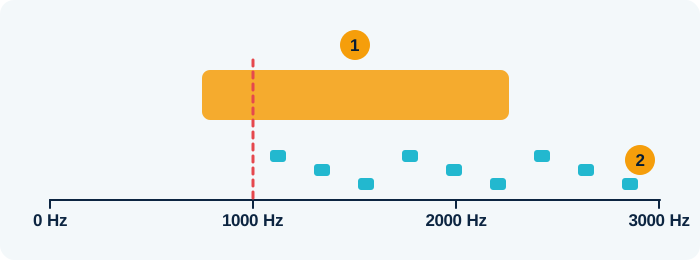
- The DXpedition (SuperFox) sends one signal about 1.5 kHz wide
- Callers (Hounds) transmit above 1000 Hz
Teaching illustration created by RadioMeteo.
The most straightforward approach is to install 3.0.2 from the official page, check the profile without transmitting, and test decoding, CAT, band changes and logging separately. If everything works, there is no need to update every external component automatically. If an error appears, the exact version and the point in the workflow where it occurs are the most useful information for deciding where to intervene.
Useful links and official documentation
- WSJT-X Downloads: General Availability releases, dates and official packages.
- WSJT-X Release Notes: changes and fixes in the 3.0 series.
- WSJT-X Official Home: project information and supported modes.