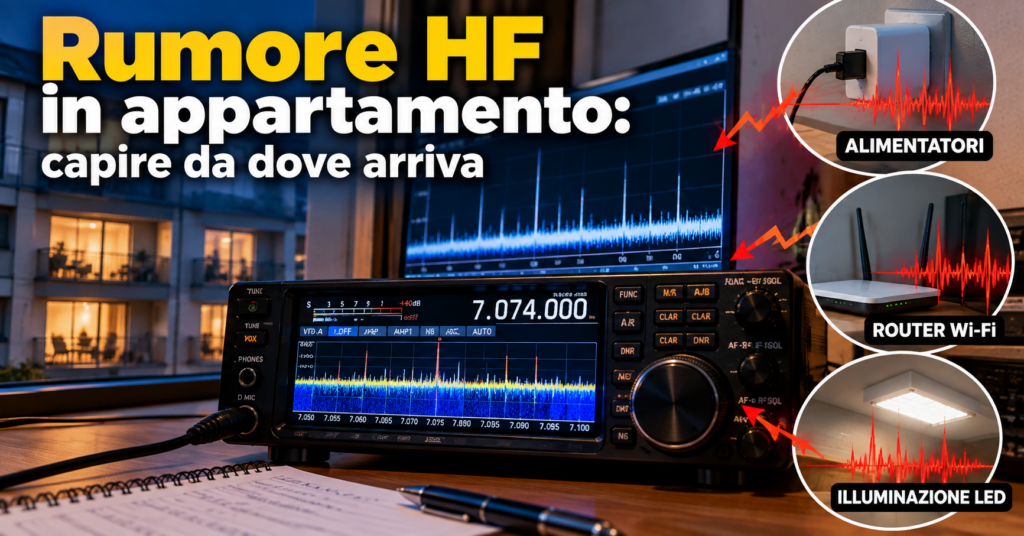
HF Shortwave, between 3 and 30 MHz, which can reach the other side of the world. noise in an apartment can come from a switching power supply, an LED lamp, another electrical circuit or the antenna itself. There is no need to start by buying a new SDR A radio where most of the work is done by software on a computer. or preamplifier An amplifier that boosts weak signals before they reach the radio.: it is better to separate the possible noise paths with short, repeatable tests.
Troubleshooting should answer three questions: does the noise remain with the antenna disconnected? Does it change when switching from the power supply to a battery? Does it disappear when the household circuits are switched off? The answers are not always conclusive on the first attempt, because interference can enter through the antenna, USB cable, coax The round cable, like a TV cable, that carries the signal from the antenna to the radio. and power supply at the same time.
First distinguish noise from overload
A high noise floor on an HF Shortwave, between 3 and 30 MHz, which can reach the other side of the world. band A group of nearby frequencies used for the same purpose, like a lane on a motorway. does not automatically indicate external interference. The receiver The device that “listens” to radio signals. may be overloaded by strong signals, or it may generate part of the noise internally. The value shown by the S-meter The radio’s indicator that shows how strong the received signal is. and the appearance of the waterfall A scrolling chart that shows signals as coloured stripes over time. are clues, not proof of the source.
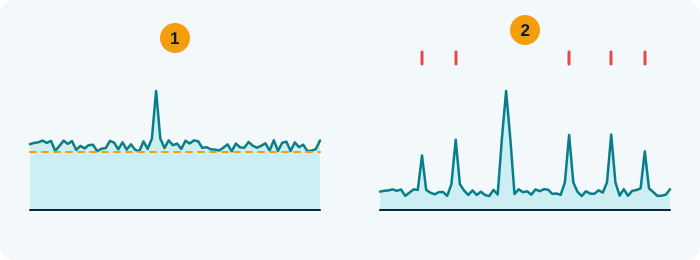
- Noise: the “floor” rises everywhere and hides weak signals
- Overload: fake signals appear and move when you change the gain
Quick test: lower the gain. If the strange signals vanish, it was overload.
Teaching illustration created by RadioMeteo.
Observe the interference on several bands and note whether it is continuous, impulsive, modulated, made up of lines or accompanied by crackling. Also record the times and which devices are operating. Noise that changes during the day or at weekends may be linked to household appliances or systems in the building. A variation linked to wind and rain, after internal circuits have been ruled out, may instead point to a source on external power lines.

- Through the air: the noise reaches the antenna directly
- On the coax: it “runs” along the cable shield
- From the mains: it comes in from the socket and the power supply
Teaching illustration created by RadioMeteo.
The first test: antenna disconnected
Reduce the system to the simplest configuration possible. Disconnect the antenna from the receiver The device that “listens” to radio signals. and observe what happens on the same band A group of nearby frequencies used for the same purpose, like a lane on a motorway. and in the same reception mode. If the noise drops sharply, a substantial part of it is arriving through the antenna or the connected path.
If the noise remains almost unchanged, there are several possibilities:
- the receiver is generating the interference internally;
- the noise is entering through the power supply;
- a USB cable, computer or monitor is connected to the receiver;
- the interference is so strong that it is radiating directly into the equipment or nearby cables.
A disconnected antenna does not always mean that the input is perfectly isolated. A cable left near the receiver may continue to pick up an electromagnetic field. This is why the test is mainly useful for comparison: band, gain How much an antenna or amplifier “boosts” the signal., position and receiver settings must remain constant.
HF noise in an apartment: battery versus power supply
Comparing battery operation with the power supply is one of the quickest ways to find out whether the mains contributes to the problem. Run the receiver The device that “listens” to radio signals. from its internal battery or another independent source, then completely disconnect the power supply from both the outlet and the equipment. Do not leave the cable connected: it may continue to act as a receiving or radiating element.
If the noise decreases when the receiver runs from a battery, check the power-supply unit and the cable routing. The cause may be the converter itself, the cable, the ground or a USB connection. Repeat the test by disconnecting the computer, monitor, hub and chargers wherever possible. A power bank can be useful for comparison, but it does not by itself prove that the problem has been solved: the USB cable and connected devices can also transfer interference.
If the noise does not change on battery power, that does not mean the electrical system is unrelated. The antenna may be picking up a domestic device or an external source directly. The battery removes one possible conducted path, not interference radiated through the surrounding environment.
Switch off the main breaker and restore the circuits
When the installation allows it and the operation is safe, switch off the apartment’s main breaker and observe the receiver The device that “listens” to radio signals.. If the interference disappears or is greatly reduced, the source is probably connected to an internal circuit or to a device powered from that panel.
Restore the circuits one at a time. When the noise returns, physically unplug the devices in the affected area, one by one. Switching a device off with its remote control or leaving it in standby is not always enough: its power supply may remain active.
In an apartment building, switching off the main breaker in your own apartment does not rule out a nearby source. The noise may come from another apartment, a shared area or external power lines. If it remains with your own installation switched off, the search must move to the surrounding environment, without automatically blaming the public power grid.
Which devices to check first
Low-cost switching power supplies are among the first things to check, especially when they power media players, set-top boxes, monitors, computers or small devices that are always left connected. A device that appears to be switched off may still have its converter running.
Also check:
- LED lamps and their power supplies;
- lamp dimmers;
- televisions and monitors;
- computers, hubs and chargers;
- set-top boxes and small multimedia devices;
- appliances with electronic control systems.
The most reliable test is to unplug the device, wait a few seconds and check the noise floor again. If the interference changes, note the device and the affected band A group of nearby frequencies used for the same purpose, like a lane on a motorway. before plugging it back in. This helps prevent two different sources producing similar noise from being confused with each other.
When the interference seems to come from outside
Broadband noise, with components spread across several bands, may be consistent with electrical sources and arcing on power lines. Its signature may include pulses or harmonics extending from the lower frequencies into MF, HF Shortwave, between 3 and 30 MHz, which can reach the other side of the world. and sometimes VHF The frequencies between 30 and 300 MHz, home to FM radio and aircraft, for example.. The perceived sound depends on the source and the receiver The device that “listens” to radio signals.’s bandwidth How much room a signal takes up across the frequencies..
In the US context described in ARRL documentation, some interference associated with a 60 Hz power system may show a typical repetition rate of 120 pulses per second. This should not be applied automatically to every installation: on 50 Hz systems, the reference may be different.
Times, weather conditions and activity in the neighbourhood provide useful clues, but they do not replace verification. To find a direction, you can use a small loop or portable receiver, moving around without approaching accessible electrical parts. If the field increases in one area, the source may be there; if it decreases when you rotate the antenna, you can use the corresponding null while listening.
A loop can also improve reception indoors because it allows you to change its orientation and position. It is not a guaranteed remedy, however: if the noise is strong throughout the building or is received directly by the loop, the benefit may be limited. Distance from the source often matters more than the specific antenna model.
Antenna, coax and power: different paths
Noise can reach the receiver The device that “listens” to radio signals. by conduction or radiation. In the first case it travels through the power supply, mains, USB, ground or connected cables. In the second, it is picked up by the antenna, the coaxial shield or a cable that is acting as a radiating element.
This distinction explains why a test that appears successful may not solve everything. Replacing the power supply may remove conducted noise, while the antenna continues to receive the same field. Conversely, moving the antenna may reduce the radiated signal while leaving a component entering through the power cable.
For more on the relationship between the antenna, filters and signal level, see the guide to SDRs, antennas, filters and gain without overloading the receiver.
Ferrites and chokes: what they can really do
A ferrite A ring of special material that blocks interference on cables. only works when it is applied to the right cable and in the appropriate frequency The “channel” a station transmits on. range. A clip-on ferrite on the power cable may attenuate a common-mode component, but it does not necessarily block differential-mode noise. A filter designed for one path will not act in the same way on another.
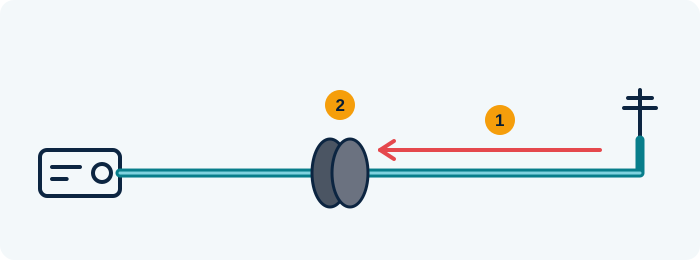
- Common-mode current: noise travels back to the radio on the outside of the shield
- The choke (ferrite or coiled cable) blocks it, the real signal passes
A ferrite only helps if the noise really travels on the cable.
Teaching illustration created by RadioMeteo.
At HF Shortwave, between 3 and 30 MHz, which can reach the other side of the world., toroids are generally more effective than simple clip-on ferrites or beads, according to ARRL documentation. The result depends on the material, number of turns, cable diameter and installation point. The component must also be suitable for the circuit’s voltage and current.
Placing the choke A “plug” made of coiled cable or ferrite that stops interference on the outside of the coax. close to the source may prevent the interference from travelling along the cable; installing it close to the receiver The device that “listens” to radio signals. may instead reduce what is entering the equipment. Neither position is automatically better. Make one change at a time and check whether the noise changes on the band of interest.
If a ferrite reduces interference on the power cable but the noise floor remains high, the noise may be entering through the antenna or a USB cable. Adding ferrites without identifying the path may move the entry point without removing the source.
Moving the antenna or receiver
In an apartment, position can affect the result more than the receiver itself. Try moving the antenna away from power supplies, lamps, monitors and bundles of cables. If you use a loop, rotate it and note the directions in which the noise decreases. The reception minimum may help attenuate a source without changing the equipment.
Taking the receiver or antenna to a balcony, courtyard or park is also a diagnostic test. If the noise floor drops sharply away from the building, the problem may be local to the apartment or the building structure. If the noise remains, more extensive external sources, or sources present at the new location, must be considered.
When the home environment remains too noisy, a remote receiver or an outdoor listening session can provide a cleaner comparison. These do not identify the source by themselves, but they help separate the limits of the local installation from the actual band conditions.
Mistakes to avoid during troubleshooting
- Changing the receiver immediately: a new SDR may perform differently, but it will not remove a source present in the environment.
- Adding a preamplifier: it amplifies the noise as well and may make things worse if the noise floor is already high.
- Using generic filters: without knowing whether the interference is differential-mode, common-mode or radiated, the result is unpredictable.
- Relying only on the waterfall: the display helps compare tests, but it does not by itself show the signal path.
- Changing several things at once: if you change the antenna, power supply and position at the same time, you will not know which action caused the variation.
For HF DX, position remains part of the station design. The guide to antennas for HF DX can help assess antenna distance, orientation and trade-offs without treating any single model as a universal solution.
A simple way to compare tests
Record each check in a table or notebook. Include the band, time and a short description of the noise. Also note the antenna, power source and position: these details are more useful than a single S-meter reading.
| Test | If the noise decreases | Possible indication |
|---|---|---|
| Antenna disconnected | The component drops | Entry through the antenna or its cable |
| Battery with mains disconnected | The noise floor drops | Power supply, USB or conducted path |
| Apartment main breaker switched off | The interference disappears | Source on an internal circuit or device |
| Loop rotated or moved | A null appears | A possible direction for attenuating the source |
| Moved outside the apartment | The noise floor drops | Problem linked to the home environment or building |
Frequently asked questions
Does battery operation prove that the power supply is faulty?
No. It indicates that the power supply or an associated connection contributes to the interference. The antenna may continue to receive radiated noise even when the receiver is running from a battery.
Does a ferrite on the coax always solve the problem?
No. It may reduce a common-mode component on the cable, but it will not remove noise received directly by the antenna and does not replace a search for the source.
Is a loop always better than a wire?
No. It may offer advantages because it can be rotated and used to exploit nulls, but the result depends on its position, the source and the noise present in the building.
If I switch off the main breaker and the noise remains, where is it coming from?
It may come from another apartment, shared areas, outside, or from the receiver and its cables. The test narrows the possibilities, but does not identify the source by itself.